Role-based access control (RBAC)
Role-based access control lets you decide exactly what each user can do in Dime.Scheduler. You build rolesUser roleA named bundle of user actions assigned to users and user groups. Permissions flow through roles, never directly to a user. from protected features, then assign those roles to users and user groups.
Roles, user actions and user (groups)
User actionsUser actionA single protected capability, such as 'edit appointment', that a role can grant. The building block of role-based access control. are the logical grouping of protected features in Dime.Scheduler. Dime Software defines them, and you cannot modify them. On their own, user actions do nothing. They only take effect once you bundle them into roles and assign those roles to users and user groupsUser groupA container that coalesces users so security, profiles and layouts can be managed and shared for the whole group at once..
A role is simply a collection of user actions. You assemble roles however you like, and you decide which users (and groups) get which roles. Roles and user actions are independent of each other. Overlaps are fine: a user gets access to all distinct user actions across every role assigned to them.
The diagram below shows the relationship between roles and user actions:
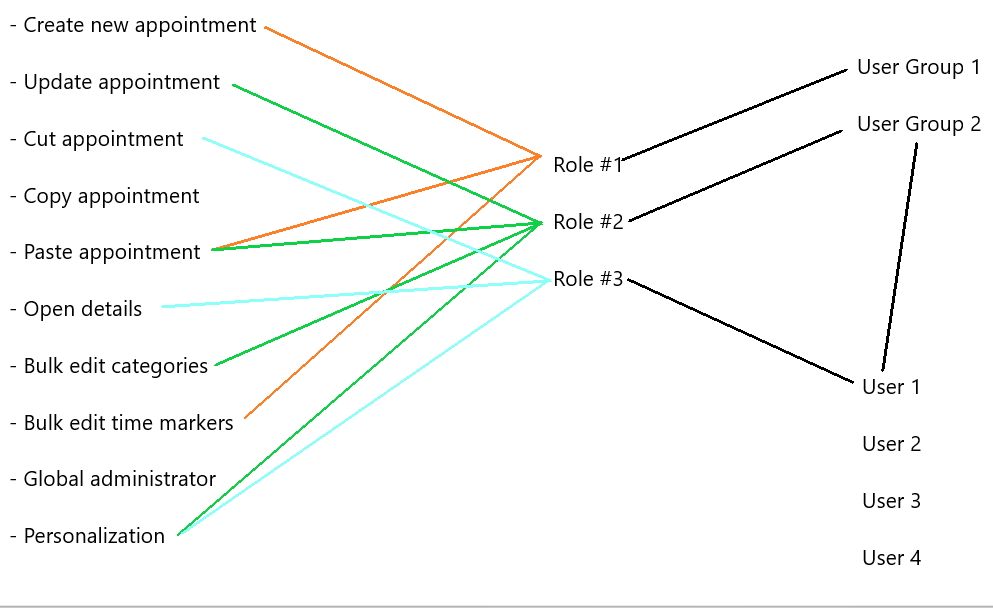
In this example, there are:
- Three roles, each with its own set of user actions
- Two roles assigned to user groups
- One role assigned to a user directly
User 1 receives all user actions from role 3 and role 2. The two roles overlap, but that makes no difference. The result is:
- Update appointment (role 2)
- Paste appointment (role 2)
- Personalization (role 2, role 3)
- Open details (role 2)