Project Planning & Management
This initiative is being scoped. The page will be expanded as the design firms up.
Dime.Scheduler is growing into a full project planning and project management product. Today it answers "who is doing what on which day?" Tomorrow it also answers "what is going on across the entire portfolio, and can we deliver what we've sold?"
The starting point is the top of the organization, not the calendar.
The shift
Most planning tools start at the calendar - a row per resource, an appointment per cell - and leave the executive to assemble the bigger picture out of status emails. We're inverting that: the portfolio is the home view, and the calendar is what you end up at after you've drilled down.
This makes Dime.Scheduler answer questions it cannot answer today:
- Which projects are slipping, and why?
- Can we take this new project on, and when can we start?
- Where are the staffing gaps over the next six months?
- Which roles do we need to hire, train, or contract?
It also gives the people doing the work a real home in the product, so the planner is not the only one putting data in.
From portfolio to calendar
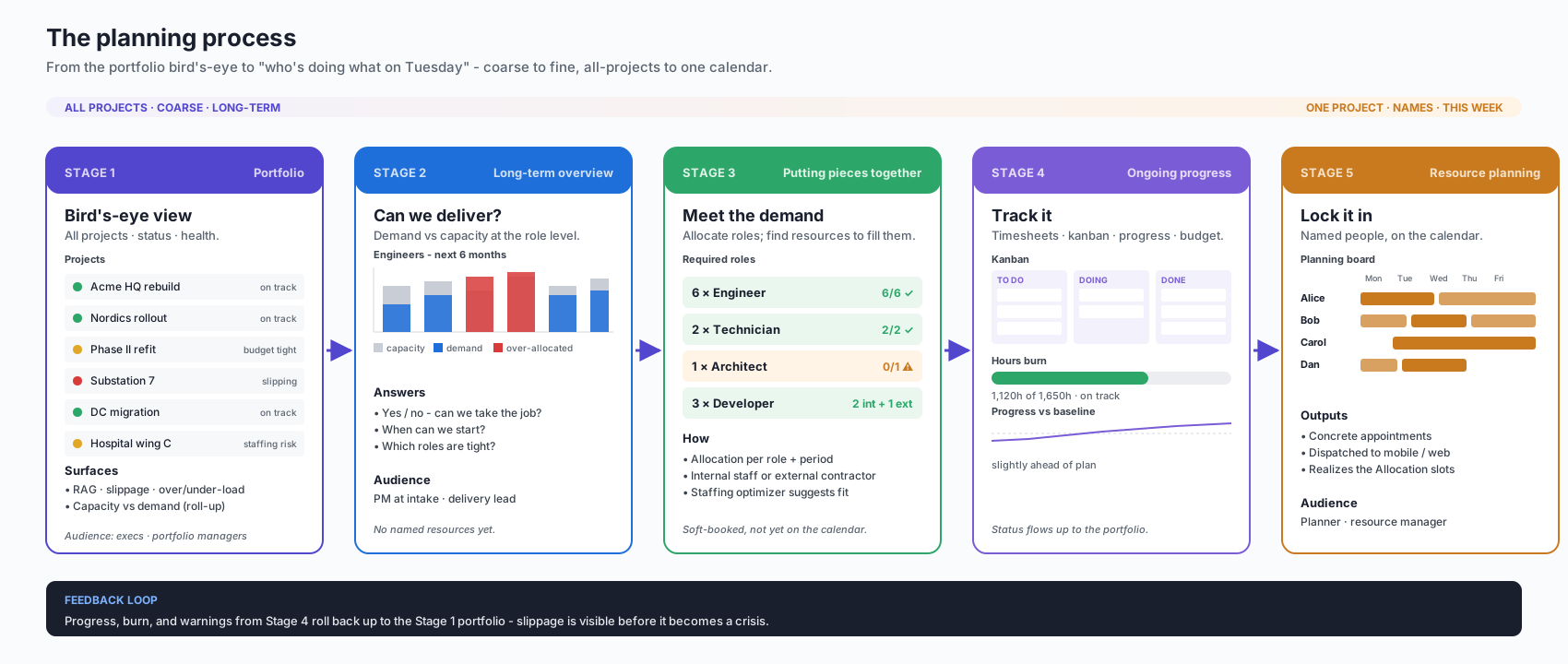
The diagram above reads left to right - coarse to fine, all projects to one calendar.
- Portfolio. Every project on one page, with health, slippage, and the capacity-vs-demand roll-up. The view for executives and portfolio managers.
- Feasibility. Demand against capacity at the role level. Can we take the job? When can we start? Which roles are tight? - answered before any name is on the project.
- Allocation. Lay out the roles each project needs over time. Mix internal staff with external contractors. The staffing optimizer suggests who fits where; nothing is locked yet.
- Execution. As work starts, progress, hours, and budget burn feed back into the picture. Kanban boards and timesheets are the everyday surfaces for the people doing the work, and their updates roll back up to the portfolio.
- The calendar. Named people on named days. The planning board you already know - now driven by everything upstream and dispatching to the mobile and web apps.
Slippage on the calendar surfaces on the portfolio. The loop closes.
What the doers get
A planning tool is only as good as the data flowing back in. The people doing the work get:
- Time sheets to log hours against the project and task.
- Kanban boards to move tasks across To do / Doing / Done.
- A deeper Gantt - dependencies, baselines, and critical path on the same canvas as the planning board.
- Hybrid planning - mix project-driven planning (phases, milestones, deliverables) with resource-driven planning (capacity, shifts, dispatch) on the same data.
With Business Central
Dime.Scheduler stays a planning tool. Business Central keeps the money - rates, budgets, billing, actuals, WIP, invoicing - and Dime.Scheduler reads what it needs. Budget shows up as a planning constraint and a burn indicator, not as a duplicated ledger.