Configuration
The webhook connectorWebhookThe generic connector that POSTs every appointment change as JSON to a URL you choose. It delivers the message and leaves interpretation to the receiving system. has the simplest configuration of any connectorConnectorAn integration that links Dime.Scheduler to a back-office system, routing data in and scheduling decisions back out. in Dime.Scheduler, because the receiving side does all the interpretation work. You give Dime.Scheduler one thing - a URL - and from then on every appointment change fires a POST to that URL with the full appointment as JSON.
The webhook connector is set up the same way every other connector is - through the Connectors page. If you haven't configured a connector before, start there for the common steps.
Setting it up
Add a new connector of type Webhook, then set the HTTP POST URI to your endpoint. The URL must be publicly accessible from Dime.Scheduler and able to accept a POST request with a JSON body.

That is the whole setup. Anything beyond this is on the receiving side: persistence, parsing, error handling, whatever workflow you want to run when an appointment arrives.
What lands at your URL
Every transactionTransactionThe recorded call Dime.Scheduler makes to a connected system when the planning changes. It counts as successful on an HTTP 200, which means the endpoint received it, not that the back office processed it. on the planning boardPlanning boardThe main graphical scheduling surface where dispatchers drag tasks onto resources across a timeline. fires the connector. The body is the full appointmentAppointmentA task scheduled to a resource for a specific period - the scheduled instance you see on the planning board. schema, so the receiver has everything it needs to act on without making a return trip to Dime.Scheduler. The fields include:
- Subject and body
- Start and end time
- Assigned resources
- The work item (taskTaskA unit of work that belongs to a job. It appears in the open task list until it is scheduled to a resource. and jobJobA high-level container, comparable to a project, that bundles related tasks together with common information such as customer, billing, and address.)
- Visual indicatorsIndicatorCollective term for the visual signals - categories, time markers, pins, and tags - that identify and label appointments.
- Custom fields
- … and more
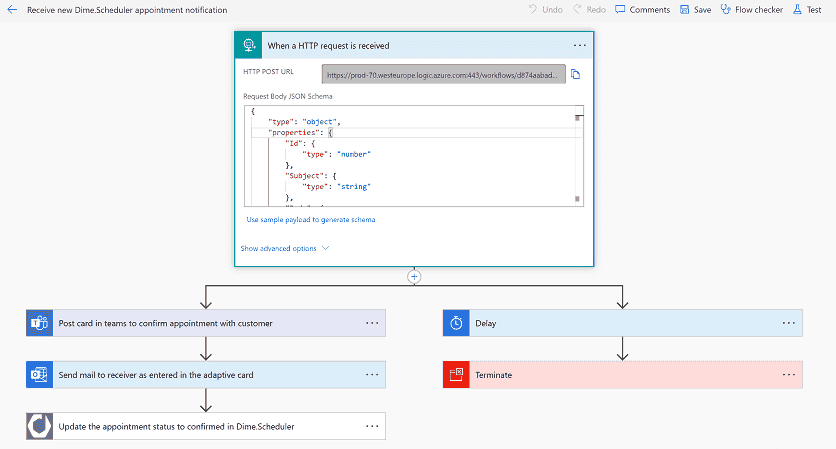
A common pattern is to wire the webhook into Power Automate, which can then fan the appointment out to email, Teams, Slack, a database, anywhere Power Automate connects:
How records get tagged: the source app
The source appSource appAn identifier Dime.Scheduler attaches to data so it can route a change back to the correct back-office system. is the identifier that says "this record came from system X". You set it on the connector, and from then on every appointment that goes through this connector carries that tag. It matters for two reasons:
- When records flow into Dime.Scheduler (from a back-officeBack officeThe ERP or business system Dime.Scheduler plans for - most often Microsoft Dynamics 365 Business Central. It owns the master data and remains authoritative over what it receives. system), the source app is what tells Dime.Scheduler which connector to use when the planner makes a change. The connector and the inbound source must agree on the same source-app value.
- When multiple systems share one tenant, the source app is what stops records from colliding - two unrelated "SO100" job numbers from two different sources stay distinct because they carry different source apps.
If the webhook is feeding a system that already lives in Dime.Scheduler under another connector (BC, for example), reuse that source app so both connectors fire on the same appointments - useful for splitting concerns ("BC handles the data, the webhook handles the email notification"). For a fundamentally new target (a CRM, a custom service), pick a unique descriptive name; it will stay with those records for their lifetime.
When to reach for Power Automate instead
You can get the same result with the Dime.Scheduler connector in Power Automate. Behind the scenes, Power Automate registers a new connector in Dime.Scheduler the moment you start a flow with one of Dime.Scheduler's triggers:
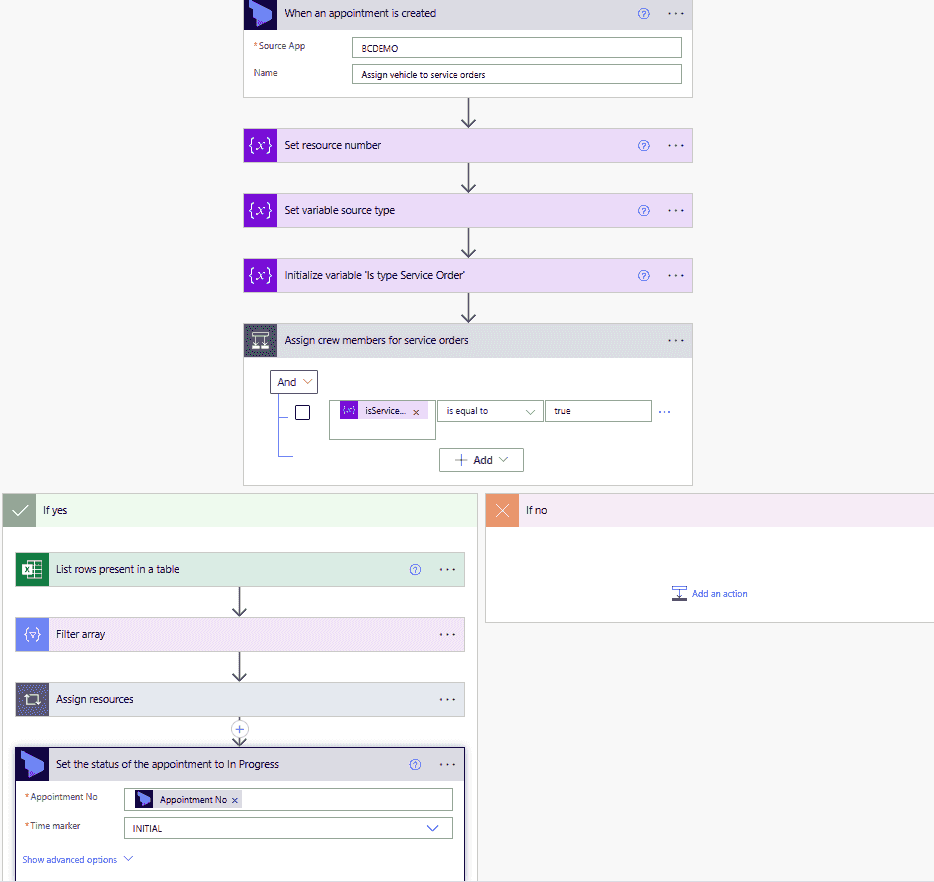
Use the webhook connector when you want a single URL receiving raw JSON and your own code processing it. Use Power Automate triggers when the no-code/low-code surface and the connectors Power Automate already offers (Outlook, Teams, SharePoint, hundreds more) save you building the receiver yourself.