Authentication
The webhook connectorWebhookThe generic connector that POSTs every appointment change as JSON to a URL you choose. It delivers the message and leaves interpretation to the receiving system. publishes planning data to an endpoint you control. Authentication is how Dime.Scheduler proves to that endpoint who is calling - so the receiver can reject random POSTs from the internet and only act on real Dime.Scheduler traffic.
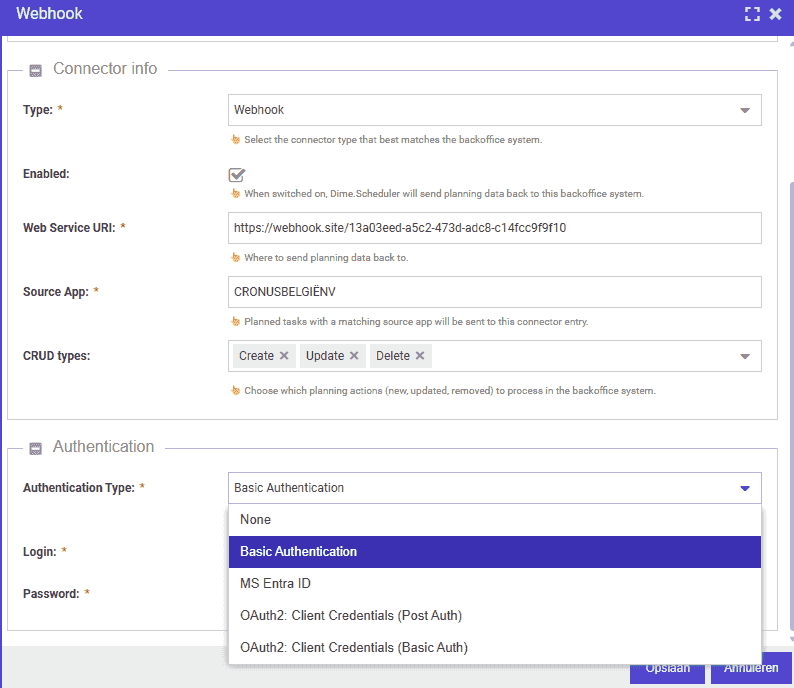
Pick the authentication type the receiver supports. If you control both sides, prefer the strongest option the receiver can implement.
The webhook connector is set up the same way every other connectorConnectorAn integration that links Dime.Scheduler to a back-office system, routing data in and scheduling decisions back out. is. If you haven't configured a connector before, start with the Connectors page for the common steps.
Supported types
- None - no credentials. Use only when the receiver is on a private network, behind another authentication layer (a gateway, an IP allow-list), or for quick tests. Never in production over the public internet.
- Basic authentication - a
loginandpassword, sent on every request. Simple, but only as secure as the transport: HTTPS is non-negotiable, otherwise the credentials are sent in clear text on every call. - MS Entra ID - the right default when both sides live in Microsoft 365 / Azure. Dime.Scheduler obtains a token from Entra ID and presents it to the receiver, so neither side ever exchanges a long-lived shared secret.
- OAuth2 - for receivers that expose any OAuth2-capable identity provider. The supported grant type is client credentials, in two flavours:
- Client secret basic - credentials go in the HTTP Authorization header (the safer flavour - prefer it when the receiver accepts both).
- Client secret post - credentials go in the request body.
Picking one
OAuth2 and MS Entra ID are the right defaults for anything reaching across the public internet. They avoid sending a credential on every call and let you rotate secrets without redeploying the receiver. Use Basic only when the receiver does not speak OAuth2 yet, and use None only when network-level controls do the authentication job for you.