Capacity
Resource capacity sync is currently in preview. Functionality and behavior may change between releases. Not recommended for production yet.
Send resource availability from Dynamics NAV to Dime.Scheduler. Next to the standard Resources table, Dime.Scheduler reads the standard Resource Capacity matrix to create capacity entries, which drive the capacity component.
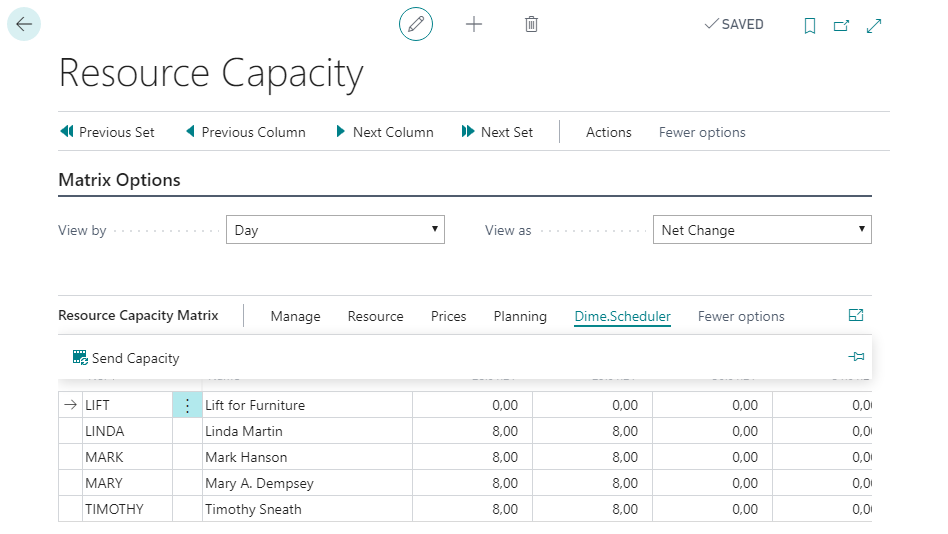
You can reach the resource capacity matrix from a few places, so there are also a few ways to push capacity to Dime.Scheduler.
Resource card
The Actions menu of the resource card offers two Dime.Scheduler actions: send the resource to Dime.Scheduler, and send the resource's capacity matrix to Dime.Scheduler.
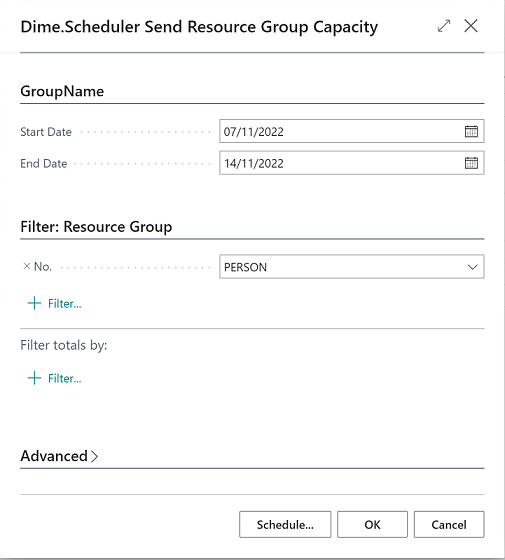
When you send capacity, enter a start and end date so Dime.Scheduler knows how many capacity entries to generate. The resource filter in this window is set for you automatically.
Capacity matrix
To generate capacity entries for several resources at once, use the resource capacity matrix instead. Click the Send Capacity button in the Dime.Scheduler submenu of the matrix: