Filter Values
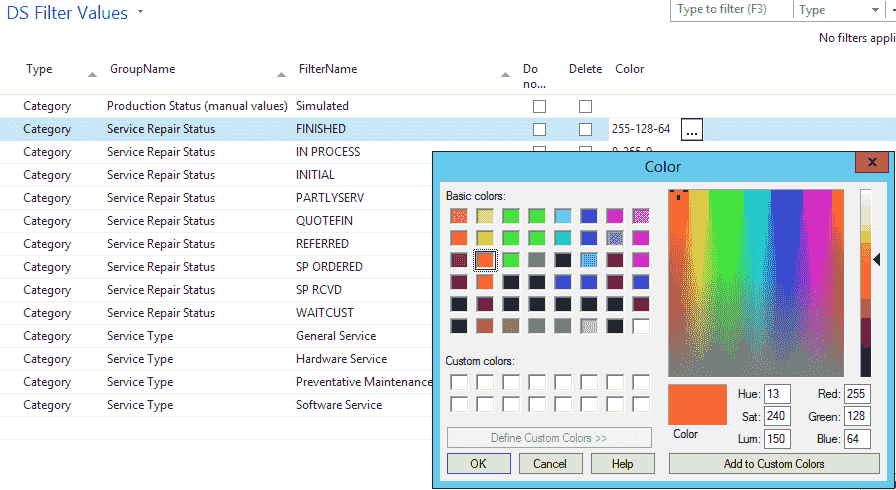
Filter values setup is where you define the available values for each filter groupFilter groupA configurable set of fields used to filter resources and tasks on the planning board., following the process described above. From here you can also set the colors for categoriesCategoryA visual indicator (a color) applied to appointments to classify or label them., time markersTime markerA visual indicator on an appointment, separate from its category, used to flag a status or condition at a point in time. and pinsPinAn indicator that lives on a task rather than an appointment and colors its marker on the map, typically by skill, vehicle type or region. It has no equivalent on the planning board. inside NAV when using the RTC or Windows client. On the DS filter value page, click the AssistEdit button to open the color picker.
Filter values vs doc filter values
Document filter values are the filter values that belong to a specific taskTaskA unit of work that belongs to a job. It appears in the open task list until it is scheduled to a resource. or resourceResourceAn entity that can carry out work - a person, vehicle, tool, or room - that you schedule on the planning board.. They are usually a subset of the filter values, which list all the available values for a filter group.
The document filter values of a task describe the characteristics a resource needs in order to perform that task. A few examples make this concrete:
- Which skillsSkillA qualification a resource holds and a task can require, typically modeled as a filter group. Skills drive resource filtering, the project team view and the solver’s choice of who can do what. are required from a person to carry out a task?
- What is the minimal pressure or power required from a machine?
- What minimum capacity is required for a conference room?
The document filter values of a resource describe what that resource offers:
- What are the skills of a person?
- What is the minimal pressure or power delivered by a machine?
- What is the capacity of a conference room?