Exchange to Dime.Scheduler
This page covers the message flow that runs from Exchange to Dime.Scheduler, where calendar events made in Outlook flow back into the planning boardPlanning boardThe main graphical scheduling surface where dispatchers drag tasks onto resources across a timeline..

How it works
The mechanics behind this direction are technically involved, but the outcome is straightforward: any change to any event of any resourceResourceAn entity that can carry out work - a person, vehicle, tool, or room - that you schedule on the planning board. tracked by Dime.Scheduler Exchange can update the schedule on the planning board.
That behavior is configurable, which gives the planner full control and keeps resources from interfering with the plan. In principle, resources could alter appointments managed in Dime.Scheduler, but not every planner wants that kind of collaboration, and not every resource wants to share their entire calendar with others. The settings below let you decide how much each side can do.
Configuration
A dedicated section controls the 'Exchange to Dime.Scheduler' message flow:
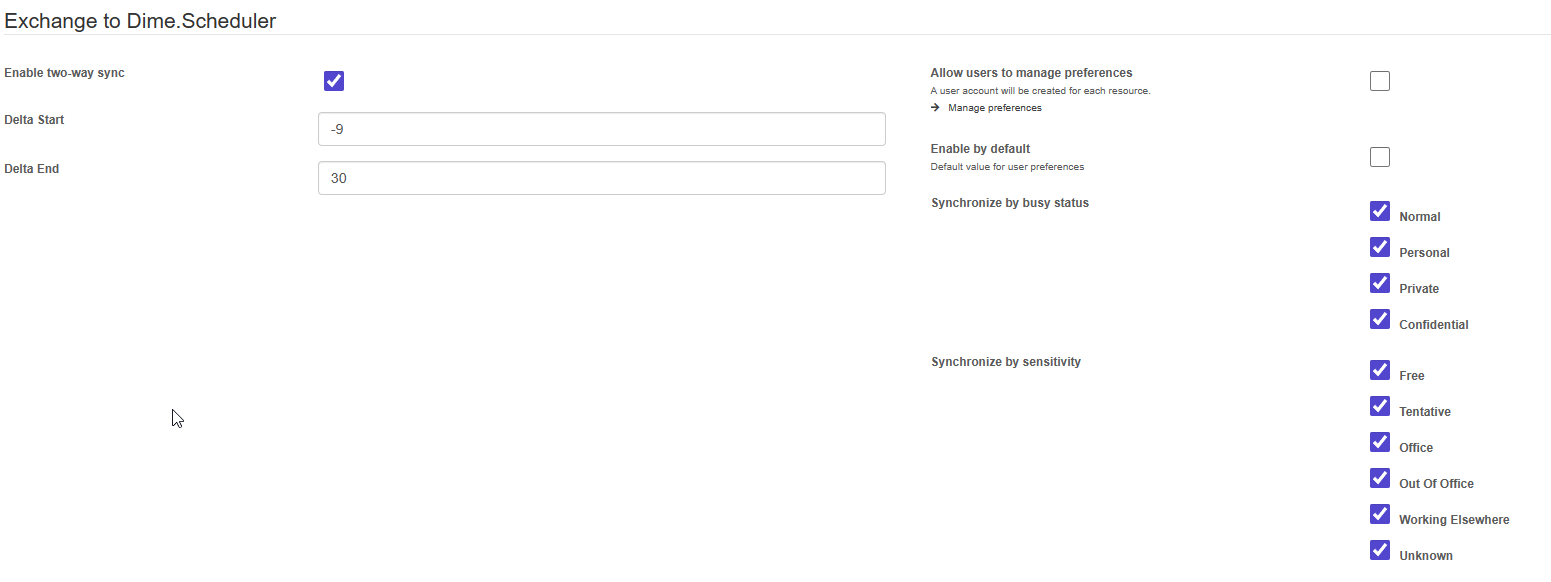
AppointmentsAppointmentA task scheduled to a resource for a specific period - the scheduled instance you see on the planning board. are sent to Dime.Scheduler for the resources that meet the configured criteria, set by either the administrator or the resources themselves:
- Enabled
- Show asShow asThe Outlook free/busy status of a calendar event: Free, Tentative, Busy, Out of office and so on. The Exchange settings pick which statuses are allowed back into the planning. status (multiple choices)
- Free
- Tentative
- Office
- Out of office
- SensitivitySensitivityThe Outlook sensitivity level of an event: Normal, Personal, Private or Confidential. Together with show as, it filters which Outlook events reach the planning board. (multiple choices)
- Normal
- Personal
- Private
- Confidential
Connector parameters
The connectorConnectorAn integration that links Dime.Scheduler to a back-office system, routing data in and scheduling decisions back out. listens for events in Exchange and pushes them to Dime.Scheduler. To do that, it needs a few parameters. As with the Dime.Scheduler to Exchange message flow, you supply details about the Azure App Registration:
- The client id of the Microsoft Entra ID application
- The client secret of the Microsoft Entra ID application
- The tenant id
Set all of these in the Exchange config section in Dime.Scheduler. For instructions on setting up the Microsoft Entra ID application, see the Exchange configuration guide.