Capacity
A schedule is only as trustworthy as the availability behind it. If Dime.Scheduler doesn't know that a resourceResourceAn entity that can carry out work - a person, vehicle, tool, or room - that you schedule on the planning board. works four days a week, is part-time in August, or takes Fridays off, the planner will happily book over hours that don't exist. Pushing a resource's available working hours from Business Central closes that gap: the hours show up in the capacity component, and the planner sees real availability instead of guessing at it.
The hours themselves already live in Business Central. Alongside the standard Resources table, Dime.Scheduler reads the standard Business Central Resource Capacity matrix to create capacityCapacityThe amount of working time a resource has available in a given period, used to spot over- and under-planning. entries. Business Central exposes that matrix in more than one place, so you have a matching choice of where to send it from: one resource at a time, or many at once.
Resource card
When you only need to push a single resource, work from its card. The Actions menu of the resource card exposes two Dime.Scheduler actions: send the resource itself, and send the resource's capacity matrix.
Choosing the capacity action asks for a start and end date, which is how Dime.Scheduler knows how many capacity entries to generate. The resource filter in this window is set for you automatically, so you only supply the date range.

Capacity matrix
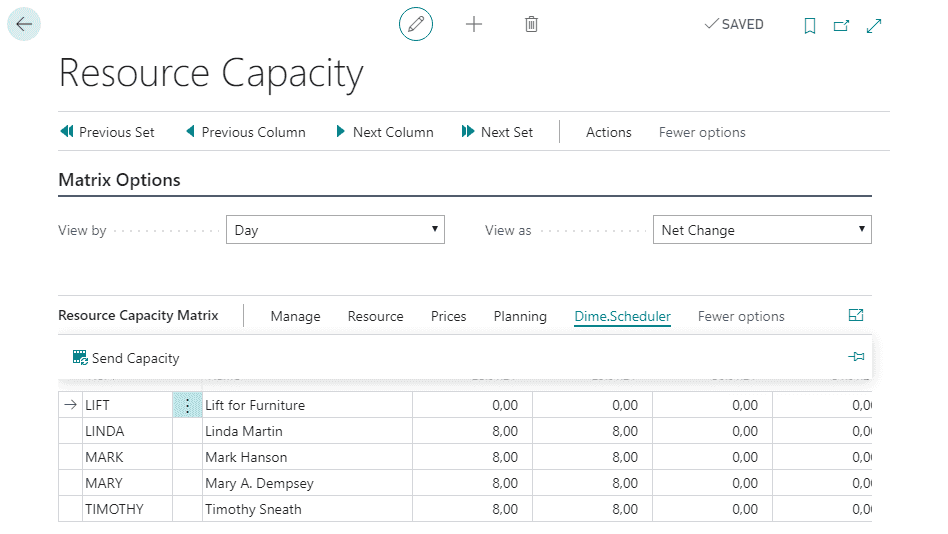
For a whole team or a department at once, the resource capacity matrix is the better starting point: it lets you generate capacity entries in bulk for several resources in a single pass. Run the Send Capacity button in the Dime.Scheduler submenu of the matrix.