Filter Values
Filter values setup is where the available values for each filter group live. If a filter group answers the question "what dimension can I plan against?", the filter values are the concrete answers to it: the individual skills, the specific zones, the actual departments a planner can pick from.
In practice you will rarely open this table and type into it. As covered in the previous article, a filter group can be sourced from another table in Business Central, such as skills, zones, and others. When you link a filter group to one of those tables, the filter groups page manages this list for you, so the values stay in step with their source instead of drifting out of sync because someone forgot to copy a new skill across.
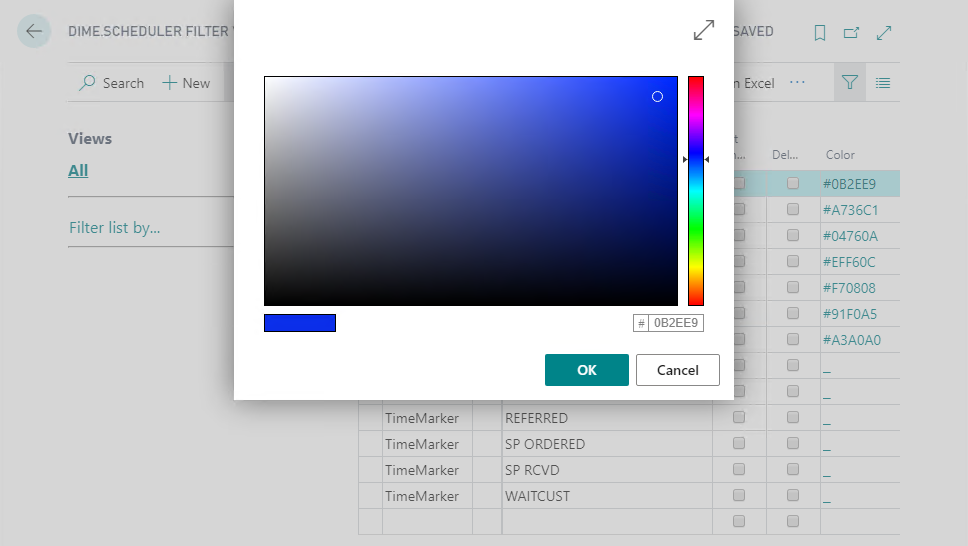
This list is also where you define categories, time markers and pins inside BC, and where you assign a color to each. Color is what makes these elements readable at a glance on the planning board, so it is worth setting deliberately. On the DS filter value page, click the Color field to open the color picker:
Filter values vs doc filter values
It is easy to confuse this table with its close relative. Filter values list every value that is available for a filter group. Document filter values, covered in the next article, are the values actually assigned to a specific task or resource, and they are usually a subset of the available values.
Put differently:
A document filter value - where "document" refers to a task or resource in Dime.Scheduler - is an assignment of a filter value to one of those entities.
The distinction matters because the same value means two different things depending on which side it sits on.
On a task, document filter values describe the characteristics required of a resource to perform the work. Think of them as the planner asking:
- Which skills are required from a person to carry out a task?
- What is the minimal pressure or power required from a machine?
- What minimum capacity is required for a conference room?
On a resource, document filter values describe the characteristics the resource actually has:
- What are the skills of a person?
- What is the minimal pressure or power delivered by a machine?
- What is the capacity of a conference room?
So a task filter value is a requirement a resource must fulfill to carry out the work, and a resource filter value is a characteristic that says what that resource is able to do. Dime.Scheduler matches the two, which is how the planner sees at a glance which resources are a fit for a job instead of cross-checking it by hand.