Assembly Order
An assembly orderAssembly orderA Business Central document that says what to build. The assembly order solution schedules the resources that build it and keeps the order’s dates in sync. in Business Central tells you what to build, but says nothing about who builds it or when they are free to do it. The FastTrack solutionFastTrack solutionOne module of the Business Central or NAV connector that makes a kind of record plannable, such as service orders or production routing. Each has its own enable switch in the FastTrack wizard. for assembly order planning closes that gap: you schedule the resourcesResourceAn entity that can carry out work - a person, vehicle, tool, or room - that you schedule on the planning board. that build the order on the Dime.Scheduler planning boardPlanning boardThe main graphical scheduling surface where dispatchers drag tasks onto resources across a timeline., and Business Central stays in sync the whole way.
That sync runs in both directions, which is the part planners care about. Drag a taskTaskA unit of work that belongs to a job. It appears in the open task list until it is scheduled to a resource. onto a resource and the matching resource line appears on the assembly order in BC; as the schedule fills in, the starting, ending and due dates on the header follow the first and last planned taskPlanned taskAn appointment together with the resources assigned to it - the full picture of what will be done, by whom, and when. automatically, so the consultant never has to retype a date that was already decided visually. For assemble-to-order, that even reaches the linked sales orderSales orderA Business Central sales document. The sales planning solution lets you schedule resources against its lines and keeps the dates on both sides in sync., where the shipment date is updated to match. And because the link is two-way, resource lines you create on the assembly order in BC before sending it over arrive in Dime.Scheduler as planned tasks, so you can pre-assign resources up front and let the board take it from there. A single order can carry as many resources as the work needs, spread across whatever dates and times suit them.
Setup

Enable assembly orders solution
Select Enable Assembly Order planning to turn on the FastTrack solution.
Configure standard assembly orders
Three settings tune the default behavior:
Default Duration Assembly Ord.sets how long a planned task runs when you drag it from open tasksOpen taskA task that has not been scheduled yet. It waits in the open task list to be placed on the planning board. onto a resource on the planning board. Leave it and a task defaults to 1 hour; enter a different value to change that.Update Dateswrites the schedule back to BC. With it on, the starting, ending and due date on the assembly header are derived from the first and last date of the planned tasks in Dime.Scheduler. When the order is linked to a sales order (assemble-to-order), the shipment date on the corresponding sales line is updated too.Send Resources with Orderturns resource lines that already exist on the assembly order in BC into planned tasks in Dime.Scheduler when you send the order over.
Usage
Watch the video below for a short introduction of this module in Dime.Scheduler:
Actions
The default actions on this page have been extended with the items below.
For the list actions on this type, see common actions.
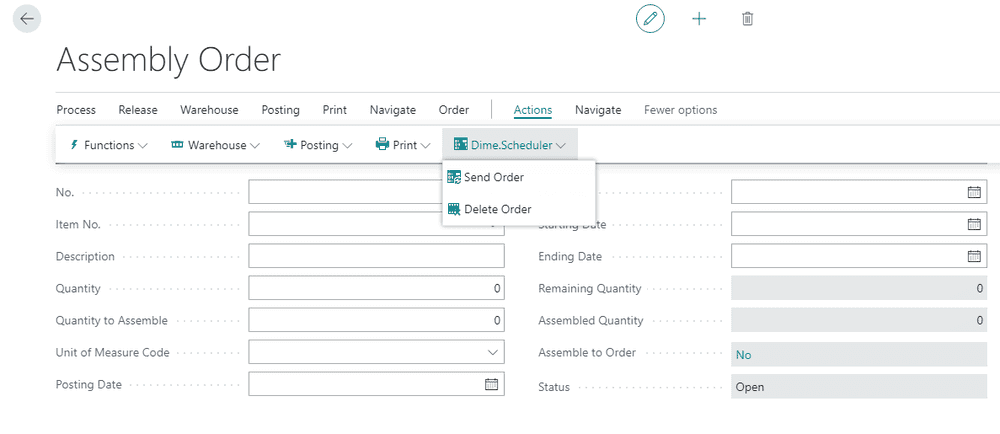
On the assembly order card itself, two actions are added:
- Send order
- Delete order
Creating assembly orders
The mechanism is straightforward: create an assembly order, run the send to Dime.Scheduler action, and the connectorConnectorAn integration that links Dime.Scheduler to a back-office system, routing data in and scheduling decisions back out. gathers the relevant data about the order and its work items and ships it over. The following entities feed into the graph:
- Assembly header
- Assembly lines
- Sales header
- Assemble to order
- Customer (sell and bill)
The two sources play different roles. The sales order populates the parts of the job that describe the destination, such as the ship-to fields; the remaining fields come from the assembly header. Once the order arrives, the tasks are created.
The module can also send resources to Dime.Scheduler as appointmentsAppointmentA task scheduled to a resource for a specific period - the scheduled instance you see on the planning board., provided the Send resource with order setup flag is switched on. With it on, Dime.Scheduler automatically creates appointments (planned tasks) for the resource lines already on the assembly order, so the work you pre-assigned in BC lands on the board ready to go.
Global setup tunes the rest, including the default duration assembly order that sets the default duration of an appointment when you drag the task to the planning board.
Planning assembly orders
The open task grid lists the work that still needs a slot. Planning an assembly item is a single gesture: drag the task onto the right timeslot for the right resource, and the assembly order is registered.
Behind the scenes, a resource line for the assembly order is created automatically in Business Central. This record holds the information of the appointment you just planned, and the two stay linked, so any change to the sales order appointments is reflected immediately in Business Central.
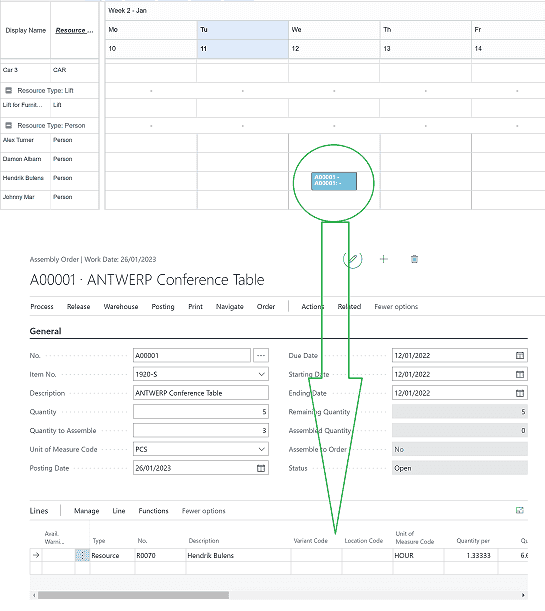
Switch on the Update Dates setup flag and the dates on the assembly header follow the schedule as well. The fields that are updated are:
- Starting date
- Ending date
- Due date
If the record is assembled to order, the sales order is reopened and the shipment date is updated with the latest date.
This way, Dime.Scheduler builds on standard Business Central functionality and adds visual scheduling on top of it.