Extending the Dime.Scheduler extension
Head straight for the repo and try it out now!
Build your own Business Central extension and connect it to Dime.Scheduler. In this tutorial you'll create an extension from scratch and work through a small example that sends salespersons as resourcesResourceAn entity that can carry out work - a person, vehicle, tool, or room - that you schedule on the planning board. and opportunities as planning items.
Prerequisites
The Dime.Scheduler base app must be installed and configured. You also need a running instance of Dime.Scheduler itself, since Dime.Scheduler does not run inside Business Central. The extension mostly maps data between the two systems, as you'll see.
Step 1: Create a new project
Create a new AL project the way you normally would, for example with the AL:Go command. Then add a dependency on Dime.Scheduler in the app.json file:
{
    "id": "dimescheduler",
    "name": "Dime.Scheduler",
    "publisher": "Dime.Scheduler",
    "version": "2.6.0.0"
}
Download the symbols by opening the command palette (CTRL + SHIFT + P) and running AL: Download Symbols. As noted in the prerequisites, this only works when the Dime.Scheduler base app is installed in the BC instance configured in your launch.json file.
Your finished app.json file might look something like this:
{
    "id": "mydimeschedulerextension",
    "name": "My Dime.Scheduler Extension",
    "publisher": "Your Company",
    "version": "1.0.0.0",
    "brief": "Integration with Dime.Scheduler",
    "description": "Extension for integrating Business Central with Dime.Scheduler",
    "privacyStatement": "",
    "EULA": "",
    "help": "",
    "url": "",
    "logo": "",
    "dependencies": [
        {
            "id": "dimescheduler",
            "name": "Dime.Scheduler",
            "publisher": "Dime.Scheduler",
            "version": "2.6.0.0"
        }
    ],
    "screenshots": [],
    "platform": "16.0.0.0",
    "application": "16.0.0.0",
    "idRanges": [
        {
        "from": 2088000,
        "to": 2088999
        }
    ],
    "resourceExposurePolicy": {
        "allowDebugging": true,
        "allowDownloadingSource": false,
        "includeSourceInSymbolFile": false
    },
    "runtime": "14.0"
}
Step 2: Registering source types
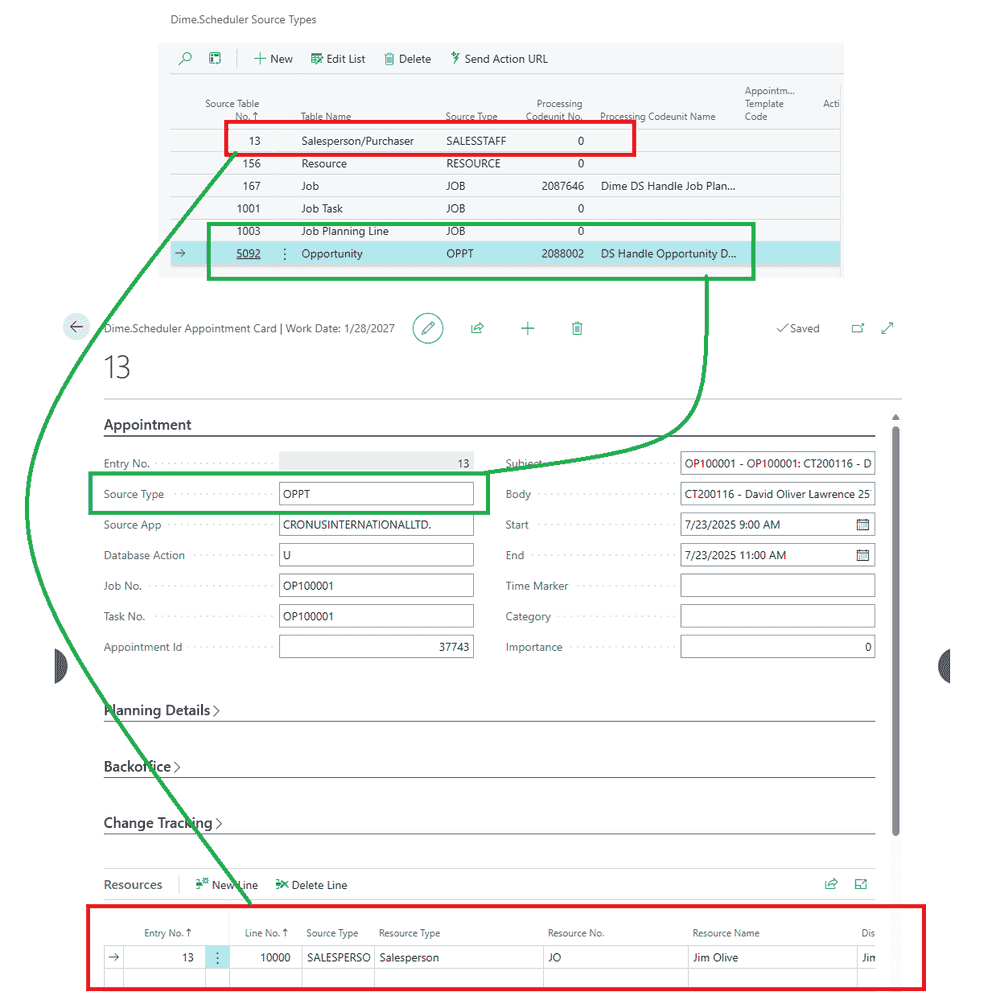
To plan additional BC tables in Dime.Scheduler, register them in the Dime.Scheduler Source Types table. This source typeSource typeAn identifier that, together with the source app, tells Dime.Scheduler which back-office table a record belongs to. metadata travels with every record you send to Dime.Scheduler. When planning data comes back from Dime.Scheduler to Business Central (in the Dime.Scheduler Appointments table), the source type tells you which table the entry belongs to, so you can process the planning data correctly.
In this example, we add two tables:
- Salespersons
- Opportunities
This setup only needs to happen once, so you can add the entries manually while developing. For production, use an installation code unit instead.

Create Install.codeunit.al to set up your source types:
codeunit 2088007 "DS Install Demo"
{
    Subtype = Install;

    trigger OnInstallAppPerCompany()
    begin
        InitializeDSSourceTypes();
    end;

    local procedure InitializeDSSourceTypes()
    var
        DSSourceType: Record "Dime DS Source Type";
        DimeDSSetup: Record "Dime DS Setup";
    begin
        // Check if setup exist
        if not DimeDSSetup.Get() then
            exit;

        // Initialize SalesPerson source type
        if not DSSourceType.Get(DATABASE::"Salesperson/Purchaser") then begin
            DSSourceType.Init();
            DSSourceType."Table No." := DATABASE::"Salesperson/Purchaser";
            DSSourceType."Source Type" := 'REP';
            DSSourceType.Insert();
        end;

        // Initialize Opportunity source type
        if not DSSourceType.Get(DATABASE::Opportunity) then begin
            DSSourceType.Init();
            DSSourceType."Table No." := DATABASE::Opportunity;
            DSSourceType."Source Type" := 'OPP';
            DSSourceType."Processing Codeunit No." := Codeunit::"DS Handle Opportunity Demo";
            DSSourceType.Insert();
        end;
    end;
}
This code unit registers the two tables. Salespersons are marked with the type "REP" and opportunities with "OPP". The exact value doesn't matter, as long as it doesn't clash with other supported tables and stays under 10 characters.
The opportunities table has an extra property: Processing Codeunit No.. As you'll see shortly, the Dime.Scheduler extension mostly consists of "Sending" and "Handling":
- Sending: making planning data available in Dime.Scheduler (outgoing)
- Handling: processing planning received from Dime.Scheduling (incoming)
When BC receives appointmentsAppointmentA task scheduled to a resource for a specific period - the scheduled instance you see on the planning board. with the "OPP" source type, it invokes Codeunit::"DS Handle Opportunity Demo" to process the planning data in the right place.
Step 3: Create the salesperson integration
To plan opportunities, you first need the salespersons list available in Dime.Scheduler. The typical pattern is to add a button to both the list and the card.
Sending salespersons
Start with the logic that creates resources in Dime.Scheduler from the salespersons list. Create Salesperson/SendSalesperson.codeunit.al:
codeunit 2088003 "DS Send Sales Person Demo"
{
    TableNo = "Salesperson/Purchaser";

    trigger OnRun()
    var
        DimeDSSetup: Record "Dime DS Setup";
        DimeDSConnectorSetup: Record "Dime DS Connector Setup";
        DimeDSDocFilterValueMgt: Codeunit "Dime DS Doc. Filter Value Mgt.";
        DimeDSDimeSchedulerMgt: Codeunit "Dime DS Dime.Scheduler Mgt.";
        DSSendOpportunityDemo: Codeunit "DS Send Opportunity Demo";
        RecRef: RecordRef;
    begin
        // Ensure setup records exist
        if not DimeDSConnectorSetup.Get() then
            exit;

        if not DimeDSSetup.Get() then
            exit;

        // Transfer the filter values for the resource - uses the DS Doc. Filter Value Sources setup
        RecRef.GetTable(Rec);
        RecRef.SetRecFilter();
        DimeDSDocFilterValueMgt.TransferDocFilterValues(RecRef);

        DSWebServMgt.InitParameters();

        // Mandatory fields
        DSWebServMgt.AddParameter('SourceApp', DimeDSConnectorSetup."Source App");
        DSWebServMgt.AddParameter('SourceType', DimeDSDimeSchedulerMgt.GetSourceType(DATABASE::"Salesperson/Purchaser"));
        DSWebServMgt.AddParameter('ResourceNo', Rec.Code);

        DSWebServMgt.AddParameter('ResourceName', Rec.Name);
        DSWebServMgt.AddParameter('DisplayName', Rec.Name);
        DSWebServMgt.AddParameter('ResourceType', 'Salesperson');

        // Setting DoNotShow to TRUE hides the Resource from all users
        DSWebServMgt.AddParameter('DoNotShow', DSWebServMgt.HandleBool((Rec.Blocked)));

        DSWebServMgt.AddParameter('Email', Rec."E-Mail");
        DSWebServMgt.AddParameter('Phone', Rec."Phone No.");
        DSWebServMgt.AddParameter('MobilePhone', Rec."Phone No.");
        DSWebServMgt.AddParameter('FieldServiceEmail', Rec."E-Mail");

        // Sending Links with the Resource - up to 3 are available in mboc_upsertResource, use mboc_upsertResourceUrl for more
        RecRef.GetTable(Rec);
        DSWebServMgt.AddParameter('url1', DimeDSDimeSchedulerMgt.GeneratePageUrl(RecRef, 5116));
        DSWebServMgt.AddParameter('urldesc1', 'Salesperson Card');

        DSWebServMgt.CallDimeSchedulerWS('mboc_upsertResource');
    end;

    var
        DSWebServMgt: Codeunit "Dime DS Web Service Management";

    procedure SyncSalespersons(var Salesperson: Record "Salesperson/Purchaser")
    begin
        if Salesperson.FindSet() then
            repeat
                CODEUNIT.Run(CODEUNIT::"DS Send Sales Person Demo", Salesperson);
            until Salesperson.Next() = 0;
    end;
}
This is a good illustration of what most of the Dime.Scheduler base app does: fetch BC data, map it to the Dime.Scheduler data model, and invoke the API through the DSWebServMgt code unit.
Adding buttons
List
Create SalespersonExt.PageExt.al:
pageextension 2088005 "DS Salesperson Ext Demo" extends "Salespersons/Purchasers"
{
    layout
    {
    }

    actions
    {
        addlast(Processing)
        {
            group("DS Demo Actions")
            {
                Caption = 'Dime.Scheduler Demo';
                Image = Planning;

                Action("DS Send Selection Demo")
                {
                    Caption = 'Send Selection';
                    ApplicationArea = All;
                    Image = RefreshLines;
                    ToolTip = 'Sends the selected record to Dime.Scheduler.';

                    trigger OnAction()
                    var
                        SalesPerson: Record "Salesperson/Purchaser";
                        DsSendResource: codeunit "DS Send Sales Person Demo";

                    begin
                        CurrPage.SETSELECTIONFILTER(SalesPerson);
                        DsSendResource.SyncSalespersons(SalesPerson);
                    end;
                }

                Action("DS Send All Demo")
                {
                    Caption = 'Send All';
                    ApplicationArea = All;
                    Image = RefreshPlanningLine;
                    Tooltip = 'Sends all records to Dime.Scheduler.';

                    trigger OnAction()
                    var
                        SalesPerson: Record "Salesperson/Purchaser";
                        DsSendResource: codeunit "DS Send Sales Person Demo";
                    begin
                        DsSendResource.SyncSalespersons(SalesPerson);
                    end;
                }
            }
        }
    }
}
Card
Create SalespersonCardExt.PageExt.al
pageextension 2088004 "DS Salesperson Card Ext Demo" extends "Salesperson/Purchaser Card"
{
    layout
    {

    }

    actions
    {
        addlast(processing)
        {
            group("DS Demo Actions")
            {
                Caption = 'Dime.Scheduler Demo';

                Action("DS Send Salesperson Demo")
                {
                    Caption = 'Send Salesperson';
                    ApplicationArea = All;
                    Image = RefreshPlanningLine;
                    ToolTip = 'Sends the selected record to Dime.Scheduler.';

                    trigger OnAction()
                    begin
                        Codeunit.Run(codeunit::"DS Send Sales Person Demo", Rec);
                    end;
                }
            }
        }
    }
}
Step 4: Create the opportunity integration
This follows the same pattern as the previous section: map the data and add the buttons that make opportunities available in Dime.Scheduler.
Sending opportunities
There are two planning levels worth supporting: planning an opportunity as a single task, or planning its individual stages. To choose between them, we add a configuration flag, Rec."DS Send Opportunity Header", covered right after this.
Create Opportunity/SendOpportunity.codeunit.al:
codeunit 2088000 "DS Send Opportunity Demo"
{
    TableNo = Opportunity;

    trigger OnRun()
    var
        Contact: Record Contact;
        OpportunityStages: Record "Opportunity Entry";
        DimeDSDimeSchedulerMgt: Codeunit "Dime DS Dime.Scheduler Mgt.";
        DimeDSConnectorSetup: Record "Dime DS Connector Setup";
        DimeDSSetup: Record "Dime DS Setup";
        DSWebservMgt: Codeunit "Dime DS Web Service Management";
    begin
        // Ensure setup records exist
        if not DimeDSConnectorSetup.Get() then
            exit;

        if not DimeDSSetup.Get() then
            exit;

        if not Contact.get(Rec."Contact No.") then
            exit;

        DSWebservMgt.InitParameters();

        // Mandatory fields
        DSWebservMgt.AddParameter('SourceApp', DimeDSConnectorSetup."Source App");
        DSWebservMgt.AddParameter('SourceType', DimeDSDimeSchedulerMgt.GetSourceType(DATABASE::Opportunity));
        DSWebservMgt.AddParameter('JobNo', Rec."No.");
        DSWebservMgt.AddParameter('ShortDescription', Rec.Description);
        DSWebservMgt.AddParameter('Description', Rec.Description);

        DSWebservMgt.AddParameter('Type', Rec."Sales Cycle Code");
        DSWebservMgt.AddParameter('CustomerNo', Rec."Contact No.");
        DSWebservMgt.AddParameter('CustomerName', Rec."Contact Name");
        DSWebservMgt.AddParameter('CustomerAddress', Contact.Address + ', ' + Contact."Address 2" + ', ' + Contact."Post Code" + ', ' + Contact.City);
        DSWebservMgt.AddParameter('CustomerPhone', Contact."Phone No.");
        DSWebservMgt.AddParameter('CustomerEmail', Contact."E-Mail");
        DSWebservMgt.AddParameter('ContactNo', Contact."No.");
        DSWebservMgt.AddParameter('ContactName', Contact.Name);

        // The address shown on the map in Dime.Scheduler
        DSWebservMgt.AddParameter('SiteAddress', Contact.Address + ', ' + Contact."Address 2" + ', ' + Contact."Post Code" + ', ' + Contact.City);

        DSWebservMgt.AddParameter('SitePostcode', Contact."Post Code");
        DSWebservMgt.AddParameter('SiteCity', Contact."City");
        DSWebservMgt.AddParameter('SiteCounty', Contact."County");
        DSWebservMgt.AddParameter('SiteCountry', DimeDSDimeSchedulerMgt.GetCountryCode(Contact."Country/Region Code"));
        DSWebServMgt.AddParameter('CreationDateTime', DSWebServMgt.HandleDateTime(CREATEDATETIME(Rec."Creation Date", 0T)));
        DSWebservMgt.AddParameter('Creator', CopyStr(UserId(), 1, 1024));

        DSWebservMgt.AddParameter('FreeText1', format(Rec.Status));

        // Call the Dime.Scheduler web service will insert or update the Job
        DSWebservMgt.CallDimeSchedulerWS('mboc_upsertJob');

        // Check if opportunity header should be sent as task
        if Rec."DS Send Opportunity Header" then
            this.SendOpportunityAsTask(Rec)
        else begin
            Clear(OpportunityStages);
            OpportunityStages.SetRange("Opportunity No.", Rec."No.");
            OpportunityStages.SetFilter("Sales Cycle Stage Description", '<>%1', '');
            if OpportunityStages.FindSet() then
                repeat
                    this.SendOpportunityCycleStages(OpportunityStages);
                until OpportunityStages.Next() = 0;
        end;

    end;

    local procedure SendOpportunityCycleStages(var OpportunityStages: Record "Opportunity Entry")
    var
        Opportunity: Record Opportunity;
        DimeDSDimeSchedulerMgt: Codeunit "Dime DS Dime.Scheduler Mgt.";
        RecRef: RecordRef;
        DimeDSConnectorSetup: Record "Dime DS Connector Setup";
        DimeDSSetup: Record "Dime DS Setup";
        DSWebservMgt: Codeunit "Dime DS Web Service Management";
    begin
        DimeDSConnectorSetup.Get();
        DimeDSSetup.Get();
        Opportunity.Get(OpportunityStages."Opportunity No.");

        DSWebservMgt.InitParameters();

        // Mandatory fields
        DSWebservMgt.AddParameter('SourceApp', DimeDSConnectorSetup."Source App");
        DSWebservMgt.AddParameter('SourceType', DimeDSDimeSchedulerMgt.GetSourceType(DATABASE::Opportunity));
        DSWebservMgt.AddParameter('TaskNo', format(OpportunityStages."Sales Cycle Stage"));
        DSWebservMgt.AddParameter('JobNo', Opportunity."No.");
        DSWebservMgt.AddParameter('ShortDescription', OpportunityStages."Sales Cycle Stage Description");
        DSWebservMgt.AddParameter('Description', OpportunityStages."Sales Cycle Stage Description");

        // Fields that affect default Duration and Capacity
        DSWebservMgt.AddParameter('DurationInSeconds', DimeDSDimeSchedulerMgt.ConvertDecimaltoSeconds(4)); // Fixed 4h

        // Sending Links with the Task - up to 3 are available in mboc_upsertTask, use mboc_upsertTaskUrl for more
        RecRef.GetTable(Opportunity);
        DSWebservMgt.AddParameter('url1', DimeDSDimeSchedulerMgt.GeneratePageUrl(RecRef, 5124));
        DSWebservMgt.AddParameter('urldesc1', 'Opportunity Card');

        // Call the Dime.Scheduler web service will insert or update the Task
        DSWebservMgt.CallDimeSchedulerWS('mboc_upsertTask');
    end;

    local procedure SendOpportunityAsTask(var Opportunity: Record Opportunity)
    var
        DimeDSDimeSchedulerMgt: Codeunit "Dime DS Dime.Scheduler Mgt.";
        RecRef: RecordRef;
        DimeDSConnectorSetup: Record "Dime DS Connector Setup";
        DimeDSSetup: Record "Dime DS Setup";
        DSWebservMgt: Codeunit "Dime DS Web Service Management";
    begin
        DimeDSConnectorSetup.Get();
        DimeDSSetup.Get();

        DSWebservMgt.InitParameters();

        // Mandatory fields
        DSWebservMgt.AddParameter('SourceApp', DimeDSConnectorSetup."Source App");
        DSWebservMgt.AddParameter('SourceType', DimeDSDimeSchedulerMgt.GetSourceType(DATABASE::Opportunity));
        DSWebservMgt.AddParameter('TaskNo', Opportunity."No.");
        DSWebservMgt.AddParameter('JobNo', Opportunity."No.");
        DSWebservMgt.AddParameter('ShortDescription', Opportunity.Description);
        DSWebservMgt.AddParameter('Description', Opportunity.Description);

        // Fields that affect default Duration and Capacity
        DSWebservMgt.AddParameter('DurationInSeconds', DimeDSDimeSchedulerMgt.ConvertDecimaltoSeconds(4)); // Fixed 4h

        // Sending Links with the Task - up to 3 are available in mboc_upsertTask, use mboc_upsertTaskUrl for more
        RecRef.GetTable(Opportunity);
        DSWebservMgt.AddParameter('url1', DimeDSDimeSchedulerMgt.GeneratePageUrl(RecRef, 5124));
        DSWebservMgt.AddParameter('urldesc1', 'Opportunity Card');

        // Call the Dime.Scheduler web service will insert or update the Task
        DSWebservMgt.CallDimeSchedulerWS('mboc_upsertTask');
    end;

    procedure DeleteOpportunity(Opportunity: Record Opportunity)
    var
        DimeDSDimeSchedulerMgt: Codeunit "Dime DS Dime.Scheduler Mgt.";
        DimeDSConnectorSetup: Record "Dime DS Connector Setup";
        DimeDSSetup: Record "Dime DS Setup";
        DSWebservMgt: Codeunit "Dime DS Web Service Management";
    begin
        DimeDSConnectorSetup.Get();
        DimeDSSetup.Get();

        if Opportunity."No." <> '' then begin
            DSWebservMgt.InitParameters();

            DSWebservMgt.AddParameter('SourceApp', DimeDSConnectorSetup."Source App");
            DSWebservMgt.AddParameter('SourceType', DimeDSDimeSchedulerMgt.GetSourceType(DATABASE::Opportunity));
            DSWebservMgt.AddParameter('JobNo', Opportunity."No.");
            DSWebservMgt.AddParameter('CheckAppointments', DSWebservMgt.HandleBool(DimeDSSetup."Check Appointment on Delete"));

            DSWebservMgt.CallDimeSchedulerWS('mboc_deleteJob');
        end;
    end;
}
Extend the opportunity
To make the planning level configurable, add a flag to the opportunity table and card. Follow these steps:
Table
Create OpportunityExt.TableExt.al:
tableextension 2088008 "DS Opportunity Ext Demo" extends Opportunity
{
    fields
    {
        field(2088000; "DS Send Opportunity Header"; Boolean)
        {
            Caption = 'Send opportunity header as task';
            DataClassification = CustomerContent;
            InitValue = true;
        }
    }
}
Card
Create Opportunity/OpportunityCardExt.pageext.al:
pageextension 2088001 "DS OpportunityCardExt Demo" extends "Opportunity Card"
{
    layout
    {
        addlast(Content)
        {
            group("DS Dime.Scheduler Tab")
            {
                Caption = 'Dime.Scheduler';

                field("DS Send Opportunity Header Tab"; Rec."DS Send Opportunity Header")
                {
                    ApplicationArea = All;
                    ToolTip = 'Specifies whether to send the opportunity header to Dime.Scheduler.';
                }
            }
        }
    }

    actions
    {
        addlast(processing)
        {
            group("DS Demo Actions")
            {
                Caption = 'Dime.Scheduler Demo';
                Image = Planning;

                action("DS Send to Dime.Scheduler Demo")
                {
                    Caption = 'Send to Dime.Scheduler';
                    Image = Planning;
                    ApplicationArea = All;

                    trigger OnAction()
                    var
                        DsSendOpportunity: Codeunit "DS Send Opportunity Demo";
                    begin
                        DsSendOpportunity.Run(Rec);
                    end;
                }
                action("DS DeleteFromDimeScheduler Demo")
                {
                    Caption = 'Delete from Dime.Scheduler';
                    Image = RemoveLine;
                    ApplicationArea = All;

                    trigger OnAction()
                    var
                        DsSendOpportunity: Codeunit "DS Send Opportunity Demo";
                    begin
                        DsSendOpportunity.DeleteOpportunity(Rec);
                    end;
                }
            }
        }
    }
}
Along with the configuration flag, this code adds the buttons to send and delete the opportunity in Dime.Scheduler.
Create the handle opportunity codeunit
To write planning data received from Dime.Scheduler back into Business Central, you need a code unit that handles it. What you do with that data is up to you; here we create a taskTaskA unit of work that belongs to a job. It appears in the open task list until it is scheduled to a resource. for each planned appointment.
Create Opportunity/HandleOpportunity.codeunit.al:
codeunit 2088002 "DS Handle Opportunity Demo"
{
    TableNo = "Dime DS Appointment";

    trigger OnRun()
    begin
        PerformAllocation(Rec);
    end;

    local procedure PerformAllocation(DimeDSAppointment: Record "Dime DS Appointment")
    var
        DimeDSAppointmentResource: Record "Dime DS Appointment Resource";
        DimeDSOrderLineLink: Record "Dime DS Order Line Link";
        DimeDSSetup: Record "Dime DS Setup";
        Opportunity: Record Opportunity;
        ToDo: Record "To-do";
        LineNo: Text;
    begin
        if not Opportunity.Get(DimeDSAppointment."Job No.") then
            exit; // No Opportunity found, nothing to do

        Evaluate(LineNo, DimeDSAppointment."Task No.");

        DimeDSSetup.Get();

        // New appointment: create new task + create link entry between Dime.Scheduler appointment and BC task
        if DimeDSAppointment."Database Action" = 'I' then begin
            DimeDSAppointmentResource.Reset();
            DimeDSAppointmentResource.SetRange("Entry No.", DimeDSAppointment."Entry No.");
            if DimeDSAppointmentResource.FindSet() then
                repeat
                    if (DimeDSAppointment."Sent From Backoffice") then
                        InsertDSTodoLink(DimeDSAppointment, DimeDSAppointmentResource)
                    else
                        CreateToDo(DimeDSAppointment, DimeDSAppointmentResource, Opportunity);
                until DimeDSAppointmentResource.Next() = 0;
        end;

        // Updated appointment: update task (lookup in link table)
        if DimeDSAppointment."Database Action" = 'U' then begin
            // First check if Resources planned in Dime.Scheduler are allocated in BC
            DimeDSAppointmentResource.Reset();
            DimeDSAppointmentResource.SetRange("Entry No.", DimeDSAppointment."Entry No.");
            if DimeDSAppointmentResource.FindSet() then
                repeat
                    if (DimeDSAppointment."Sent From Backoffice") then
                        UpdateDSTodoLink(DimeDSAppointment, DimeDSAppointmentResource)
                    else begin
                        DimeDSOrderLineLink.SetRange("Appointment Id", DimeDSAppointment."Appointment Id");
                        DimeDSOrderLineLink.SetRange("Resource No.", DimeDSAppointmentResource."Resource No.");
                        if DimeDSOrderLineLink.FindFirst() then begin
                            UpdateTodo(DimeDSAppointment, DimeDSAppointmentResource, DimeDSOrderLineLink);
                        end else begin
                            CreateToDo(DimeDSAppointment, DimeDSAppointmentResource, Opportunity);
                        end;
                    end;
                until DimeDSAppointmentResource.Next() = 0;

            // Then check if resources already allocated in BC have been deleted in Dime.Scheduler
            DimeDSOrderLineLink.Reset();
            DimeDSOrderLineLink.SetRange("Appointment Id", DimeDSAppointment."Appointment Id");
            if DimeDSOrderLineLink.FindSet() then
                repeat
                    DimeDSAppointmentResource.Reset();
                    DimeDSAppointmentResource.SetRange("Entry No.", DimeDSAppointment."Entry No.");
                    DimeDSAppointmentResource.SetRange("Resource No.", DimeDSOrderLineLink."Resource No.");
                    if DimeDSAppointmentResource.IsEmpty() then begin  // Resource has been removed in Dime.Scheduler
                        if ToDo.Get(DimeDSOrderLineLink."Document No.") then
                            ToDo.Delete(true);
                        DimeDSOrderLineLink.Delete(true);
                    end;
                until DimeDSOrderLineLink.Next() = 0;
        end;

        // Delete task and link entry between Dime.Scheduler appointment and BC task
        if DimeDSAppointment."Database Action" = 'D' then begin
            DimeDSOrderLineLink.Reset();
            DimeDSOrderLineLink.SetRange("Appointment Id", DimeDSAppointment."Appointment Id");
            if DimeDSOrderLineLink.FindSet() then
                repeat
                    if Todo.Get(DimeDSOrderLineLink."Document No.") then
                        Todo.Delete(true);
                    DimeDSOrderLineLink.Delete(true);
                until DimeDSOrderLineLink.Next() = 0;
        end;
    end;

    local procedure CreateToDo(DimeDSAppointment: Record "Dime DS Appointment"; DimeDSAppointmentResource: Record "Dime DS Appointment Resource"; Opportunity: Record Opportunity)
    var
        Salesperson: Record "Salesperson/Purchaser";
        Todo: Record "To-do";
        DimeDSOrderLineLink: Record "Dime DS Order Line Link";
        DimeDSEvents: Codeunit "Dime DS Events";
        DimeDSDimeSchedulerMgt: Codeunit "Dime DS Dime.Scheduler Mgt.";
    begin
        if DimeDSAppointmentResource."Resource No." <> '' then
            Salesperson.Get(DimeDSAppointmentResource."Resource No.");

        Todo.Init();
        Todo."Opportunity No." := Opportunity."No.";
        Todo.Description := DimeDSAppointment.Subject;
        Todo.Validate("Contact No.", Opportunity."Contact No.");
        Todo.Insert(true);

        Todo.Date := DimeDSDimeSchedulerMgt.DateTime2Date(DimeDSAppointment.Start);
        Todo."Ending Date" := DimeDSDimeSchedulerMgt.DateTime2Date(DimeDSAppointment."End");
        Todo."Salesperson Code" := Salesperson.Code;
        Todo."Ending Time" := 0T;
        Todo."Start Time" := DimeDSDimeSchedulerMgt.DateTime2Time(DimeDSAppointment.Start);
        Todo."Ending Time" := DimeDSDimeSchedulerMgt.DateTime2Time(DimeDSAppointment."End");
        Todo.Duration := DimeDSAppointment."End" - DimeDSAppointment.Start;

        Todo.Modify(true);

        DimeDSOrderLineLink.Init();
        DimeDSOrderLineLink."Appointment Id" := DimeDSAppointment."Appointment Id";
        DimeDSOrderLineLink."Resource No." := Salesperson.Code;
        DimeDSOrderLineLink."Document No." := Todo."No.";
        DimeDSOrderLineLink.Insert(true);
    end;

    local procedure UpdateTodo(DimeDSAppointment: Record "Dime DS Appointment"; DimeDSAppointmentResource: Record "Dime DS Appointment Resource"; DimeDSOrderLineLink: Record "Dime DS Order Line Link")
    var
        Todo: Record "To-do";
        DimeDSEvents: Codeunit "Dime DS Events";
        DimeDSDimeSchedulerMgt: Codeunit "Dime DS Dime.Scheduler Mgt.";
    begin
        if Todo.Get(DimeDSOrderLineLink."Document No.") then begin
            Todo.Date := DimeDSDimeSchedulerMgt.DateTime2Date(DimeDSAppointment.Start);
            Todo."Ending Date" := DimeDSDimeSchedulerMgt.DateTime2Date(DimeDSAppointment."End");
            Todo."Salesperson Code" := DimeDSAppointmentResource."Resource No.";
            Todo."Ending Time" := 0T;
            Todo."Start Time" := DimeDSDimeSchedulerMgt.DateTime2Time(DimeDSAppointment.Start);
            Todo."Ending Time" := DimeDSDimeSchedulerMgt.DateTime2Time(DimeDSAppointment."End");
            Todo.Duration := DimeDSAppointment."End" - DimeDSAppointment.Start;
            Todo.Modify(true);
        end;
    end;

    local procedure InsertDSTodoLink(DimeDSAppointment: Record "Dime DS Appointment"; DimeDSAppointmentResource: Record "Dime DS Appointment Resource")
    var
        Todo: Record "To-do";
        DimeDSOrderLineLink: Record "Dime DS Order Line Link";
        EntryNo: Integer;
    begin
        Todo.Get(DimeDSAppointment."Backoffice Id");
        Evaluate(EntryNo, Todo."No.");

        DimeDSOrderLineLink.Init();
        DimeDSOrderLineLink."Appointment Id" := DimeDSAppointment."Appointment Id";
        DimeDSOrderLineLink."Resource No." := CopyStr(DimeDSAppointmentResource."Resource No.", 1, 20);
        DimeDSOrderLineLink."Document No." := DimeDSAppointment."Backoffice Id";
        DimeDSOrderLineLink.Insert(true);
    end;

    local procedure UpdateDSTodoLink(DimeDSAppointment: Record "Dime DS Appointment"; DimeDSAppointmentResource: Record "Dime DS Appointment Resource")
    var
        Todo: Record "To-do";
        DimeDSOrderLineLink: Record "Dime DS Order Line Link";
        EntryNo: Integer;
    begin
        if not Todo.Get(DimeDSAppointment."Backoffice Id") then
            exit;
        Evaluate(EntryNo, DimeDSAppointment."Backoffice Id");

        DimeDSOrderLineLink.SetRange("Appointment Id", DimeDSAppointment."Appointment Id");
        DimeDSOrderLineLink.SetRange("Document No.", Todo."No.");
        DimeDSOrderLineLink.FindFirst();
        DimeDSOrderLineLink.Rename(DimeDSAppointment."Appointment Id", DimeDSAppointmentResource."Resource No.");
    end;
}
Most of this is boilerplate. A task is created and then linked to the Dime.Scheduler appointment through the "Dime DS Order Line Link" table. Thanks to this staging table, later updates in either Dime.Scheduler or Business Central are reflected in the other system.
Step 5: Build and run
Run the extension. Confirm that the source types are registered for both salespersons and opportunities.
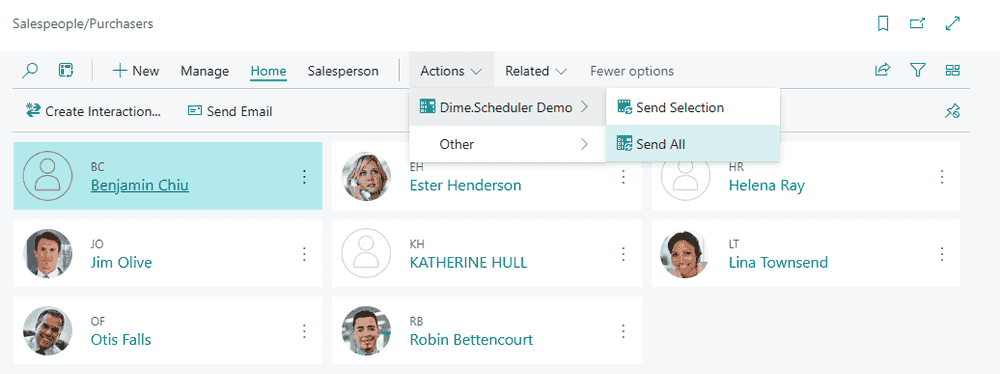
Send salespersons
- Hit ALT + Q and look for Salespersons/Purchasers
- Select one or more salespersons
- Navigate to the ribbon -> Actions -> Send to Dime.Scheduler
In Dime.Scheduler, you'll now have a list of resources with a new resource typeResource typeA logical grouping of resources, such as "excavator" or "consultant", used to organize and filter them on the planning board. of Salesperson.
Send opportunity
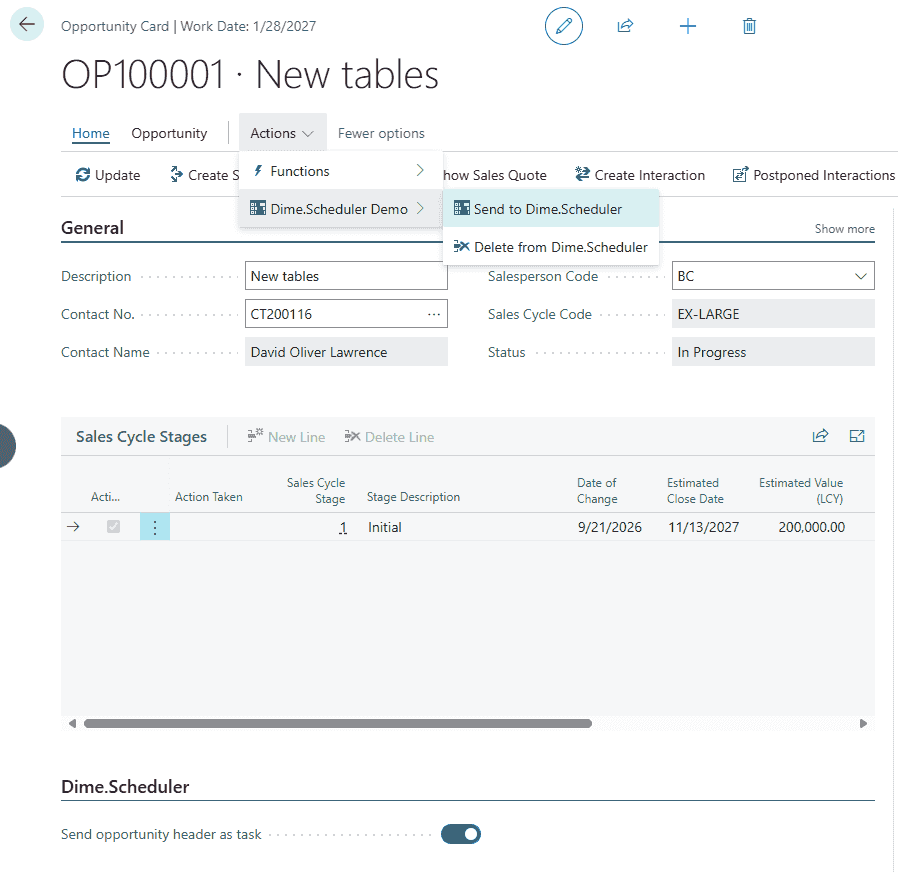
- Hit ALT + Q and look for Opportunities (list)
- Open an opportunity
- Click Send to Dime.Scheduler action
- Check Dime.Scheduler to see the new task in the open tasks listOpen taskA task that has not been scheduled yet. It waits in the open task list to be placed on the planning board.
Plan
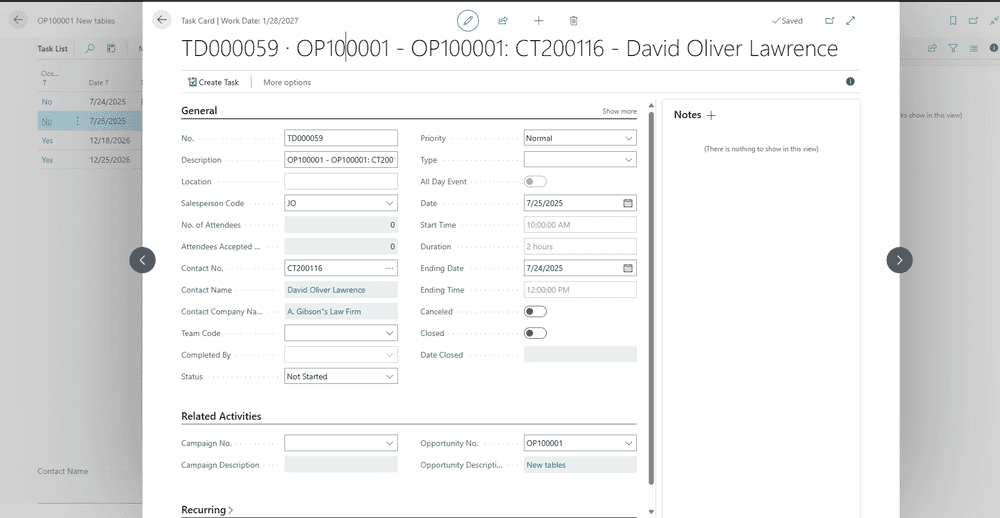
- Drag and drop the new opportunity to a salesperson.
- Select the new appointment on the planning boardPlanning boardThe main graphical scheduling surface where dispatchers drag tasks onto resources across a timeline., hit "L" on your keyboard, and open the opportunity card
- In the opportunity, go to the tasks list.
- You should see a new task that corresponds with the appointment you just created in Dime.Scheduler.
Troubleshooting
See the troubleshooting page for common issues with the integration to and from Business Central.