Appointments
When a planner drops a jobJobA high-level container, comparable to a project, that bundles related tasks together with common information such as customer, billing, and address. onto a resource in Dime.Scheduler, that decision has to make its way back into Business Central so the rest of the business (invoicing, service, project posting) can act on it. The Appointments table is where those appointmentsAppointmentA task scheduled to a resource for a specific period - the scheduled instance you see on the planning board. land. Every time a planner schedules work, the appointment is posted here as a staging recordStaging tableThe Dime.Scheduler Appointments table in Business Central where incoming appointments land first. Business Central processes rows from there, so a row can be received and still fail processing., which is why this table sits at the heart of the Business Central integration: it is the inbox where planning turns into BC data.
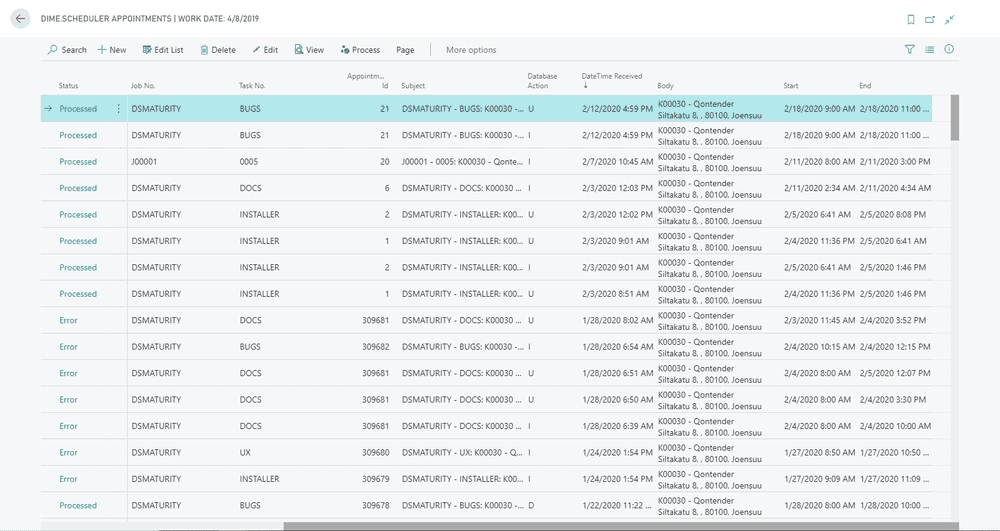
The list carries a single action, "Process", and most of the time you can ignore it. Built-in event listeners pick up new records and process them automatically, so reach for the button only when you need to retry an appointment that failed to process the first time. For the mechanics of how that automatic processing is wired up, see Source types.
Card
Open any record from the list to see its card, which lays out the full detail of a single appointment:
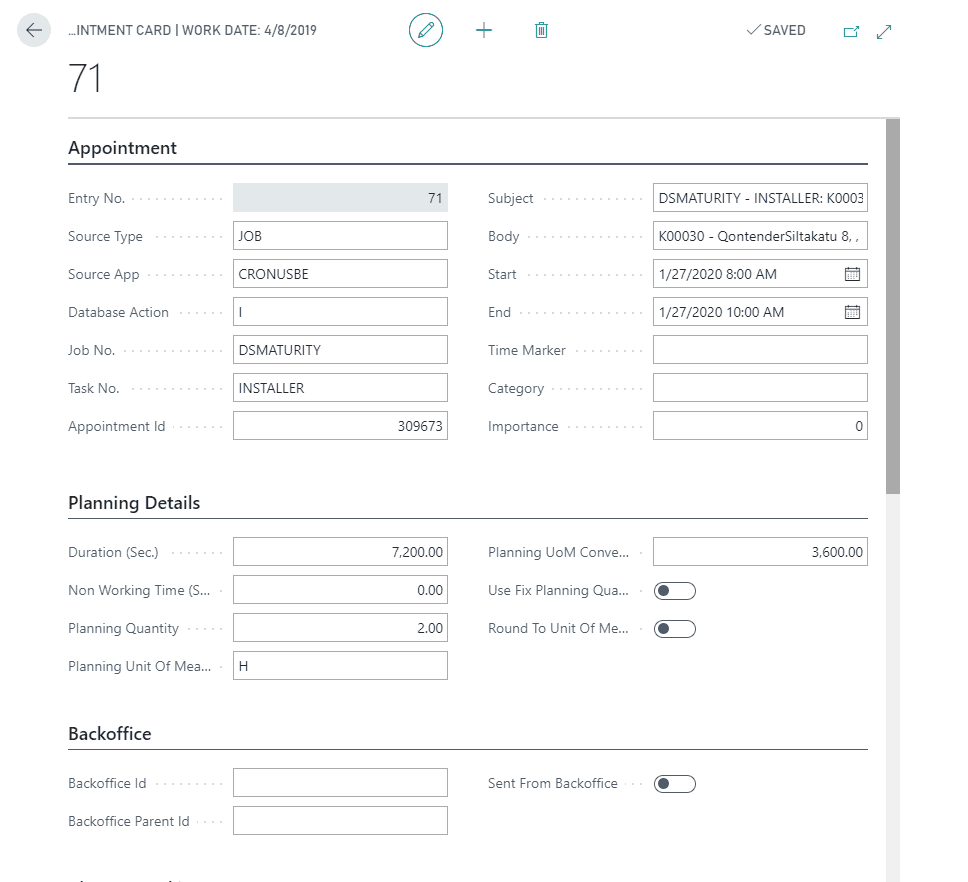
The fields are organized into groups so you can read a record top to bottom: the Appointment group holds the identity and content of the scheduled item, Planning Details captures how the work translates into quantities and durations, Back Office records where the appointment came from and whether it originated in BC, and Change Tracking is the audit trail. The full list:
| Group | Field |
|---|---|
| Appointment | Entry Number |
| Appointment | Source Type |
| Appointment | Source App |
| Appointment | Database Action |
| Appointment | Job No |
| Appointment | Task No |
| Appointment | Appointment ID |
| Appointment | Subject |
| Appointment | Body |
| Appointment | Start Date |
| Appointment | End Date |
| Appointment | Time Marker |
| Appointment | Category |
| Appointment | Importance |
| Appointment | Is All Day Event |
| Planning Details | Duration (Sec.) |
| Planning Details | Non Working Time (Sec.) |
| Planning Details | Planning Quantity |
| Planning Details | Planning Unit Of Measure |
| Planning Details | Planning UoM Conversion |
| Planning Details | Use Fix Planning Quantity |
| Planning Details | Round to Unit Of Measure |
| Back Office | Back Office Id |
| Back Office | Back Office Parent Id |
| Back Office | Sent from Back Office |
| Change Tracking | Last Modified Date |
| Change Tracking | Last Modified User |
| Change Tracking | Created Date |
| Change Tracking | Created user |
Two subgrids round out the card: one lists the resourcesResourceAn entity that can carry out work - a person, vehicle, tool, or room - that you schedule on the planning board. assigned to the appointment, the other lists the field values attached to it. Together they mirror exactly what you would see on the appointment card in Dime.Scheduler, so the card is a faithful BC-side view of the planned work rather than a stripped-down copy.
Resources
An appointment resource (also known as an assignmentAssignmentThe link between an appointment and a resource. An appointment can carry several assignments when more than one resource works on it.) is simply a resource assigned to an appointment. When a planner books two technicians onto the same job, you see two rows here. This subgrid is where that relationship is spelled out:

The following fields are available:
- Entry No
- Line No
- Source Type
- Resource Type
- Resource No
- Resource Name
- Display Name
- Alternative Resources
Field Values
An appointment field value holds the value of the custom fields and templatesAppointment templateA set of extra fields added to the appointment card, scoped to source types, so planners can capture data beyond the defaults. you have defined in Dime.Scheduler, so this is where any extra, configuration-specific data on an appointment surfaces in BC. The field values subgrid covers that relationship:

The following fields are available:
- Entry No
- Line No
- Field code
- Field Type
- Field Value