
Setup packages

Status: Preview

Setup packages are currently in preview. Functionality, file format, and behavior may change between releases. Not recommended for production deployments yet.

Most administration work is point-and-click inside a single tenant: create the users, lay out the profiles, configure the components. That is fine for one tenant, painful for ten. The moment you need to ship the same configuration to a sandbox, replicate a customer setup in a fresh environment, or commit a setup to source control so a change goes through review, the manual approach falls apart.

Setup packages are the answer to that. A setup package is a portable, human-readable JSON5 file that describes a Dime.Scheduler configuration - profiles, layouts, users, application settings - in a way you can version, diff, copy, and deploy. Use them to replicate a tenant in one command, share a configuration between instances, or hold a reusable template under git. No code required.
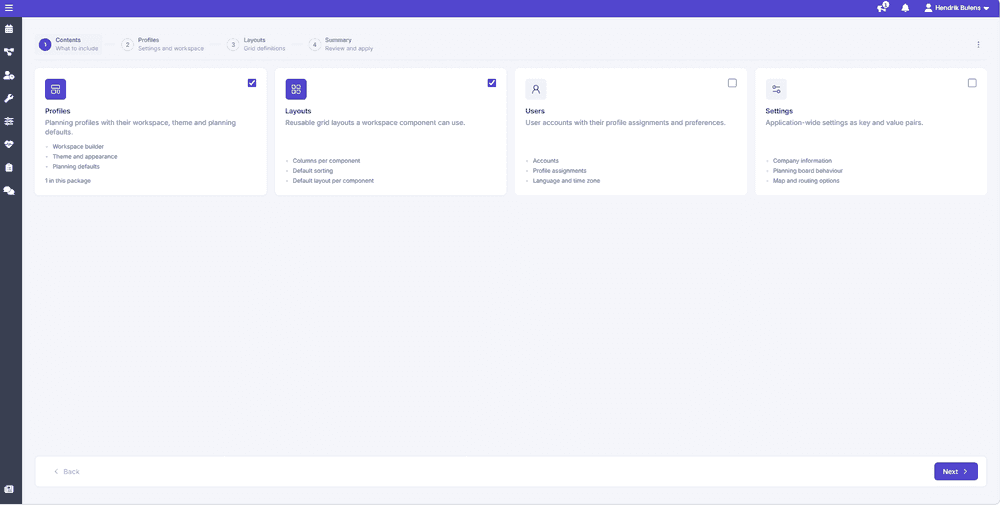
What's in a package

The following entities can be packaged:

  • Profiles: UI structure using columns, rows, stacks, and components
  • Layouts: column layouts, sorting, filtering, and contextual settings per component
  • Users: accounts, roles, profile assignments, categories, time markers, filter values
  • Configuration: system-wide application settings as key/value pairs

Two ways to use them

  • Desktop application: visual workspace, guided wizards, first-time setup
  • CLI: automation, CI/CD pipelines, version control workflows

Packages flow in both directions: import a package from Dime.Scheduler, or build one from scratch and deploy it back. Because the files are human-friendly, they store cleanly in version control and deploy automatically through the CLI.

Quick start

  1. Create a configuration file my-profile.json5:
{
type: "bundle",
name: "Complete Setup Package",
version: "1.0.0",
notificationEmail: "[email protected]",

documents: [
{
type: "profile",
payload: {
name: "Service Planning",
code: "SERVICE_PLANNING",
theme: { color: "blue" },
workspace: [
{
type: "column",
width: 30,
content: [{ type: "component", component: "openTasks", title: "Open Tasks" }]
},
{
type: "column",
width: 70,
content: [{ type: "component", component: "planningBoard", title: "Planning Board", id: "scheduler1" }]
}
]
}
}
]
}
  1. Validate your configuration:
dimescheduler-setup validate my-profile.json5
  1. Deploy to your Dime.Scheduler instance:
dimescheduler-setup deploy my-profile.json5 --api-key YOUR_API_KEY --env production

Document types

TypePurpose
profileWorkspace configuration including planning settings and the workspace tree.
layoutsGrid and component layouts.
usersUser accounts and permissions.
configurationSystem-wide application settings.

Every document follows this structure:

{
type: "profile" | "layouts" | "users" | "configuration",
payload: { ... }
}

Each document lives in the documents element of the bundle's root node. See bundles.

{
type: "bundle",
name: "Complete Setup Package",
version: "1.0.0",
notificationEmail: "[email protected]",

documents: [
{
type: "profile",
payload: {
name: "Service Planning",
code: "SERVICE_PLANNING",
// ... profile configuration
}
},
{
type: "layouts",
payload: [
// ... layout definitions
]
},
{
type: "users",
payload: [
// ... user definitions
]
},
{
type: "configuration",
payload: [
// ... configuration entries
]
}
],
}

Profile

A profile defines a complete workspace configuration: its theme, planning settings, and UI layout.

Required fields

FieldTypeDescription
namestringDisplay name (e.g., "Service Planning")
codestringUnique identifier in UPPERCASE_WITH_UNDERSCORES

Theme

Customize the visual appearance:

theme: {
color: "blue", // Accent color
scheme: "sltl" // Color scheme
}

Colors

  • default (black)
  • primary (teal)
  • red
  • green
  • orange
  • purple
  • blue

Schemes

CodeDescription
sltlLight sidebar, Light toolbar
sltdLight sidebar, Dark toolbar
sdtlDark sidebar, Light toolbar
sdtdDark sidebar, Dark toolbar (default)

Sharing

Control who can access the profile:

shared: {
global: false, // Available to all users
userGroup: "Planners" // Restrict to specific group
}

Route configuration

Configure route calculation behavior:

route: {
calculateRoutes: true, // Enable automatic route calculation
showSequenceIndicators: true, // Show sequence numbers on routes
unitOfDistance: "km" // "km" or "mi"
}

Planning settings

Configure the planning board behavior:

planning: {
snapInterval: "1hour", // Task snapping interval
range: {
mode: "week", // Display range
value: 2 // Number of units
},
start: {
mode: "startOfWeek", // Start date mode
value: 0 // Offset in days
},
hours: {
start: 8, // Working day start (0-23)
end: 18 // Working day end (0-24)
}
}

Snap interval options

5min · 10min · 15min · 30min · 1hour · 2hours · 4hours · 12hours · 1day

Range modes

ModeDescription
daySingle day view
weekWeek view
monthMonth view

Start modes

ModeDescription
todayStart from today
startOfWeekStart from beginning of current week
startOfMonthStart from beginning of current month

Workspace builder

The workspace defines the UI layout as a tree of containers and components.

Container types

Column (vertical split)

Children are stacked top-to-bottom:

{
type: "column",
width: 30, // Percentage width (0-100)
content: [ ... ] // Child elements
}

Row (horizontal split)

Children are placed side-by-side:

{
type: "row",
height: 50, // Percentage height (0-100)
content: [ ... ] // Child elements
}

Stack (tabbed container)

Only one child visible at a time, with tabs to switch:

{
type: "stack",
width: 100, // Optional
height: 50, // Optional
content: [ ... ] // Components or nested containers
}

Components

Leaf nodes that render actual UI components:

{
type: "component",
component: "planningBoard", // Component identifier
title: "Planning Board", // Tab/header title
id: "scheduler1", // Unique instance ID
layoutRef: "SCHEDULER_LAYOUT" // Optional: reference to layout code
}

Available components

openTasks · planningBoard · plannedTasks · map · indicators · resourceFilters · details · datePicker · gantt · capacity · routeSequence · notifications

Layout example

A typical two-column layout with sidebar and main content:

workspace: [
{
type: "column",
width: 25,
content: [
{
type: "stack",
content: [
{ type: "component", component: "openTasks", title: "Open Tasks" },
{ type: "component", component: "plannedTasks", title: "Planned Tasks" }
]
},
{ type: "component", component: "resourceFilters", title: "Filters" }
]
},
{
type: "column",
width: 75,
content: [
{
type: "component",
component: "planningBoard",
title: "Planning Board",
id: "scheduler1",
layoutRef: "SCHEDULER_DEFAULT"
}
]
}
]

Layouts

Layouts control how data grids and components display information. Define them inline within a component, or as standalone documents you can reuse.

Layout contexts

Each layout targets a specific component type:

planningBoard · openTasks · plannedTasks · details · capacity · gantt · routeSequence · notifications

Grid-based component layout properties

{
context: "planningBoard", // Target component type
code: "SCHEDULER_COMPACT", // Unique identifier
name: "Compact View", // Display name

// Grid configuration
columns: [
{ property: "DisplayName", width: 200 },
{ property: "Category", width: 100 }
],
sorters: [
{ property: "DisplayName", direction: "ASC" }
],
filters: [ ... ],
grouper: {
property: "Category",
direction: "ASC"
},
pageSize: 50,

// Sharing
shared: {
public: true,
userGroup: "Planners"
}
}

Planning board layout properties

Additional properties specific to the planning board (context: "planningBoard"):

{
context: "planningBoard",
code: "SCHEDULER_WEEK",

viewPreset: "week", // day, week, workWeek, month
rowHeight: "2rows", // 1row, 2rows, 3rows, 4rows
resourcesGridWidth: "25%", // Width of resource column
fitToScreen: false, // Fit grid to screen
ignoreCalendars: false // Ignore calendar configurations
}

View presets: day · week · workWeek · month

Row heights: 1row · 2rows · 3rows · 4rows

Standalone layouts document

Create reusable layouts in a separate document:

{
type: "layouts",
payload: [
{
context: "planningBoard",
code: "SCHEDULER_COMPACT",
name: "Compact Scheduler",
default: true,
viewPreset: "week",
rowHeight: "1row",
columns: [
{ property: "DisplayName" }
]
},
{
context: "openTasks",
code: "OPEN_TASKS_DEFAULT",
name: "Default Open Tasks",
columns: [
{ property: "TaskNo" },
{ property: "ShortDescription" },
{ property: "Category" }
],
sorters: [
{ property: "TaskNo", direction: "DESC" }
]
}
]
}

Referencing layouts

Reference standalone layouts from components using layoutRef:

{
type: "component",
component: "planningBoard",
title: "Planning Board",
id: "scheduler1",
layoutRef: "SCHEDULER_COMPACT" // Reference by code
}

Users

Define user accounts, their roles, and profile assignments.

User properties

{
name: "John Smith", // Display name
email: "[email protected]", // Email
isMSEntraID: true, // MS Entra ID authentication
language: "en", // Language code
timeZone: "Europe/Brussels", // IANA timezone

profiles: [
{ name: "SERVICE_PLANNING", default: true },
{ name: "FIELD_SERVICE" }
],

roles: ["Planner", "Dispatcher"],
timeMarkers: ["Lunch", "Break"],
categories: ["Urgent", "Normal"],
filterValues: ["Region A", "Region B"]
}

Users document

{
type: "users",
payload: [
{
name: "John Smith",
language: "en",
timeZone: "Europe/Brussels",
profiles: [
{ name: "SERVICE_PLANNING", default: true }
],
roles: ["Planner"]
},
{
name: "Jane Doe",
language: "nl",
timeZone: "Europe/Amsterdam",
profiles: [
{ name: "SERVICE_PLANNING" },
{ name: "FIELD_SERVICE", default: true }
],
roles: ["Dispatcher", "Administrator"]
}
]
}

Configuration

Configuration documents define system-wide application settings as key/value pairs. These settings control application behavior, integrations, and display preferences.

Configuration document

{
type: "configuration",
payload: [
{ key: "CompanyName", value: "Acme Corporation" },
{ key: "DurationFormat", value: "HoursMinutes" },
{ key: "DistanceUnit", value: "km" },
{ key: "EnablePlanningBoardTooltip", value: true },
{ key: "ExchangeDefaultShowAs", value: ["Office", "OutOfOffice"] }
]
}

Available configuration keys

CategoryKeyDescription
CompanyCompanyNameCompany name displayed in the application
CompanyAddressCompany address for route calculations
CompanyAddressCountryCountry of the company address
DisplayDurationFormatDuration format: Decimal, HoursMinutes, DaysDecimal, DaysHours
EnableAppointmentContainersEnable appointment containers feature
EnablePlanningBoardTooltipShow tooltips on planning board appointments
RenderCategoryInBackgroundRender category color in appointment background
AlternateRowsAlternate row colors in planning board
EnableResourceCalendarsVisualisationShow resource calendar zones on planning board
ResourceZonesColorColor for resource availability zones (hex format)
PlanningApplyRequestedDatesApply requested date constraints when planning
ApplyRequestedTimesApply requested time constraints when planning
RespectAllowedDateConstraintsRespect allowed date constraints from source system
MultiDayCapacityDistributionModeMulti-day capacity distribution: None, Constant, Even
ResourceCalendarRecalculationModeCalendar recalculation: None, ExtendDuration, UpdatePlanningQuantity, SubtractNonWorkingTime
DoNotCountAssignmentDo not count appointment resource in capacity calculations
DisableTaskDurationCalculationDisable automatic recalculation of planning quantity
RoutingRouteReschedulingModeRoute rescheduling: DoNothing, UpdateTravelTime, Optimize
CalculateRouteAndTravelTimeCalculate route and travel time automatically
DistanceUnitUnit of distance: km, mi
RouteProfileRoute profile: car, van, truck, motorcycle, bicycle, pedestrian
ShowWaypointsShow waypoints on map routes
MobileMobileVisibilityModeForLockedAppointmentsLocked appointment visibility: Locked, Hidden
AI & OptimizationSolverApiKeyAPI key for route optimization solver
EnableRouteModelEnable route optimization features
EnableFieldServiceModelEnable field service solver (VRP)
ChatShow AI chat feature in sidebar
OpenAiApiKeyOpenAI API key for AI chat features
Exchange SyncExchangeClientIdMicrosoft Entra ID App Registration client ID
ExchangeClientSecretMicrosoft Entra ID App Registration client secret
ExchangeClientTenantMicrosoft Entra ID App Registration tenant ID
ExchangeEnableTwoWaySyncEnable two-way sync between Exchange and Dime.Scheduler
ExchangeDeltaStartDelta start time for Exchange sync (e.g., -30 days)
ExchangeDeltaEndDelta end time for Exchange sync (e.g., 30 days)
ExchangeResourcePreferencesEnabledAllow users to manage their Exchange sync preferences
ExchangeDefaultShowAsBusy status filter (array): Free, Tentative, Office, OutOfOffice, WorkingElsewhere, Unknown
ExchangeDefaultSensitivitySensitivity filter (array): Normal, Personal, Private, Confidential
ExchangeCategoryPresetCategory preset for Exchange appointments
ExchangeUseCategoryUse category for Exchange appointments

Bundles

Bundles combine multiple documents into a single, atomic deployment. To deploy profiles, layouts, users, and configuration together, include them all in the documents array.

Bundle structure

{
type: "bundle",
name: "Complete Setup Package",
version: "1.0.0",
notificationEmail: "[email protected]",

documents: [
{
type: "profile",
payload: {
name: "Service Planning",
code: "SERVICE_PLANNING",
// ... profile configuration
}
},
{
type: "layouts",
payload: [
// ... layout definitions
]
},
{
type: "users",
payload: [
// ... user definitions
]
},
{
type: "configuration",
payload: [
// ... configuration entries
]
}
],

mergeStrategy: {
layouts: "append", // append, replace, error
users: "append", // append, replace, error
profiles: "last-wins" // last-wins, first-wins, error
}
}

Merge strategies

Control how duplicate items are handled:

StrategyBehavior
appendAdd new items, keep existing (default for layouts/users)
replaceReplace all existing items
errorFail if duplicates exist
last-winsLast definition wins (default for profiles)
first-winsFirst definition wins

Examples

Basic profile

A minimal profile with planning board and open tasks:

{
type: "profile",
payload: {
name: "Basic Planning",
code: "BASIC_PLANNING",

theme: {
color: "blue",
scheme: "sltl"
},

planning: {
snapInterval: "1hour",
range: { mode: "week" },
hours: { start: 8, end: 17 }
},

workspace: [
{
type: "column",
width: 25,
content: [
{
type: "component",
component: "openTasks",
title: "Open Tasks"
}
]
},
{
type: "column",
width: 75,
content: [
{
type: "component",
component: "planningBoard",
title: "Planning Board",
id: "scheduler1"
}
]
}
]
}
}

A complete profile with all components and custom layouts:

{
type: "profile",
notificationEmail: "[email protected]",
payload: {
name: "Service Planning",
code: "SERVICE_PLANNING",

theme: {
color: "primary",
scheme: "sdtd"
},

shared: {
global: false,
userGroup: "Planners"
},

route: {
calculateRoutes: true,
showSequenceIndicators: true,
unitOfDistance: "km"
},

planning: {
snapInterval: "30min",
range: { mode: "week", value: 2 },
start: { mode: "startOfWeek" },
hours: { start: 7, end: 19 }
},

workspace: [
{
type: "column",
width: 20,
content: [
{
type: "stack",
content: [
{ type: "component", component: "openTasks", title: "Open Tasks" },
{ type: "component", component: "plannedTasks", title: "Planned" }
]
},
{ type: "component", component: "resourceFilters", title: "Filters" },
{ type: "component", component: "datePicker", title: "Calendar" }
]
},
{
type: "column",
width: 60,
content: [
{
type: "component",
component: "planningBoard",
title: "Planning Board",
id: "scheduler1",
layoutRef: "SCHEDULER_DETAILED"
}
]
},
{
type: "column",
width: 20,
content: [
{ type: "component", component: "map", title: "Map" },
{ type: "component", component: "details", title: "Details" },
{ type: "component", component: "indicators", title: "Indicators" }
]
}
]
}
}

Complete bundle

A bundle with profile, layouts, and users:

{
type: "bundle",
name: "Service Department Setup",
version: "1.0.0",

documents: [
// Profile
{
type: "profile",
payload: {
name: "Service Planning",
code: "SERVICE_PLANNING",
theme: { color: "blue" },
workspace: [
{
type: "column",
width: 30,
content: [
{ type: "component", component: "openTasks", title: "Tasks" }
]
},
{
type: "column",
width: 70,
content: [
{
type: "component",
component: "planningBoard",
title: "Board",
id: "scheduler1",
layoutRef: "SCHEDULER_DEFAULT"
}
]
}
]
}
},

// Layouts
{
type: "layouts",
payload: [
{
context: "planningBoard",
code: "SCHEDULER_DEFAULT",
name: "Default Scheduler",
default: true,
viewPreset: "week",
rowHeight: "2rows",
columns: [
{ property: "DisplayName" },
{ property: "Category" }
]
}
]
},

// Users
{
type: "users",
payload: [
{
name: "Service Manager",
profiles: [{ name: "SERVICE_PLANNING", default: true }],
roles: ["Administrator", "Planner"]
},
{
name: "Dispatcher",
profiles: [{ name: "SERVICE_PLANNING", default: true }],
roles: ["Planner"]
}
]
}
],

mergeStrategy: {
layouts: "append",
users: "append",
profiles: "last-wins"
}
}

CI/CD integration

GitHub Actions example:

name: Deploy Configuration

on:
push:
branches: [main]
paths:
- 'config/**'

jobs:
deploy:
runs-on: ubuntu-latest
steps:
- uses: actions/checkout@v4

- name: Setup Node.js
uses: actions/setup-node@v4
with:
node-version: '20'

- name: Install CLI
run: npm install -g @dimescheduler/setup

- name: Validate
run: dimescheduler-setup validate config/bundle.json5

- name: Deploy to Sandbox
if: github.ref == 'refs/heads/develop'
run: dimescheduler-setup deploy config/bundle.json5 --env sandbox -y
env:
DS_API_KEY: ${{ secrets.DS_API_KEY_SANDBOX }}

- name: Deploy to Production
if: github.ref == 'refs/heads/main'
run: dimescheduler-setup deploy config/bundle.json5 --env production -y
env:
DS_API_KEY: ${{ secrets.DS_API_KEY_PRODUCTION }}

Import from Dime.Scheduler

User-generated content

From the user-generated content page in Dime.Scheduler, export a bundle that contains profiles and the default layouts of the components in those layouts.

From there, import the raw JSON file into the setup package builder.

System

The System page has a button to export all supported non-transactional setup:

  • Profiles
  • Layouts
  • Users

From there, import the raw JSON file into the setup package builder.