Resource capacity
CapacityCapacityThe amount of working time a resource has available in a given period, used to spot over- and under-planning. is the answer to one question: how much work can this resource take on in this period? Eight hours on a normal Tuesday, six on the Friday they leave early, zero on a public holiday. Capacity is what feeds the pivot component, the Gantt chart, and the overload indicatorsIndicatorCollective term for the visual signals - categories, time markers, pins, and tags - that identify and label appointments. on the planning boardPlanning boardThe main graphical scheduling surface where dispatchers drag tasks onto resources across a timeline. - and without it, the system has no way to tell the planner that they have just booked twelve hours of work into an eight-hour day.
For most setups, capacity is generated from the calendars and rarely touched by hand. This page is where you do touch it: spot-check a resource's numbers when something looks off, override a specific day for a sick leave or a half-day off, or regenerate the whole grid from calendars after a calendar change.
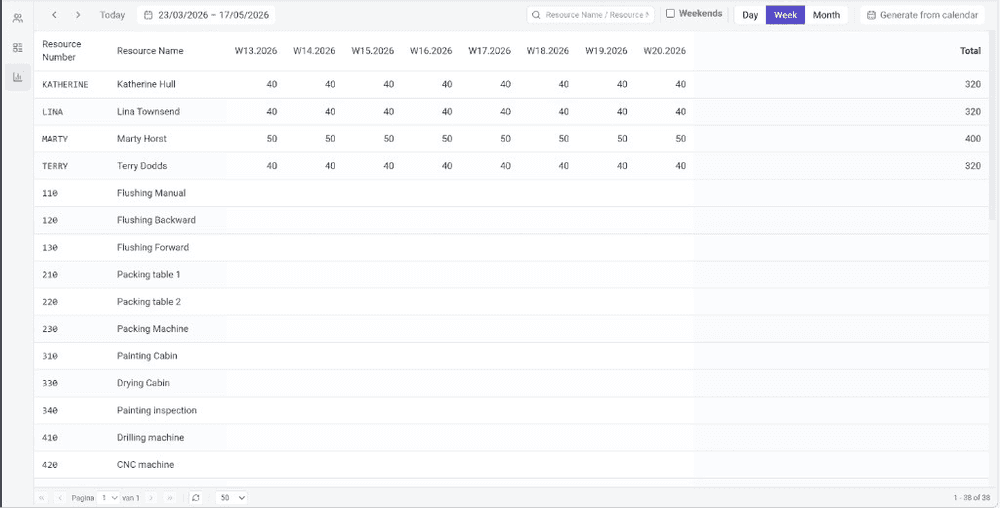
Reading the matrix
The view renders a matrix: one row per resourceResourceAn entity that can carry out work - a person, vehicle, tool, or room - that you schedule on the planning board., one column per time bucket. The view mode controls the bucket size:
- Day - one column per day. Weekends always show.
- Week - one column per week. Weeks start on the first day of the week of your locale, so a Sunday-start locale sees Sunday-to-Saturday columns, and the week numbers follow the same rule.
- Month - one column per month.
In the week and month views, weekends are hidden by default; toggle the Weekends checkbox to bring them back when they matter (a 7-day operation, a weekend service window).
Navigating the date range
Standard navigation lives in the toolbar:
- < / > shift the visible range one period back or forward.
- Today centres the range on today.
- The date range picker lets you jump to an arbitrary start and end.
The Search box on the right filters by resource name or resource numberResource numberThe identifier a resource carries in the back office. Time entries and other records are keyed on it, so a resource created by hand without one cannot have time registered., and pagination at the bottom keeps large rosters from slowing the view down.
Editing one cell at a time
Click any cell to edit the capacity value for that resource and time bucket. Setting it to 0 removes the entry. Capacity comes from these entries alone: nothing is read from the calendarCalendarA definition of when work can happen, for the whole tenant or for specific resources: business hours, weekends and holidays. Calendars shade non-working time on the planning board and skip it in Gantt durations. at planning time, so a bucket without an entry has no capacity. The capacity views treat such a bucket as unknown rather than overloaded, showing what is planned on it without a load percentage and never in red. To fill buckets from the calendar, regenerate them as described below. Edits commit as soon as you leave the cell.
Regenerating from calendars
When the calendar changes and you want capacity to follow, use the Generate from calendar button (the calendar icon in the top-right) instead of editing cells by hand. The dialog asks for:
- The date range to cover.
- The resources to regenerate for. The matrix's current set is the default; the search field lets you narrow it.
Then confirm. The generation runs in the background and writes capacity entries from each resource's working pattern, including calendar overrides - the same source of truth used elsewhere in the application.
Generating from a calendar overwrites capacity entries for the selected resources and date range. Any manual tweaks made in the matrix are lost for the affected cells. Use this when calendars are the source of truth; avoid it after you have done hand-tuning you want to keep.