Planning digest
A field crew that drives in at 7 a.m. wants their day on paper before they leave the depot. A subcontractor who works for you twice a week wants tomorrow's stops emailed by close of business. A regional manager wants a Monday morning view of the week ahead. The planning digestPlanning digestA recurring e-mail with a PDF of the schedule for a group of resources, sent daily, weekly or monthly to a shared inbox or to each resource. Recipients need no account or license. is the recurring, hands-off way to deliver those views: you describe once what should go out, to whom and when, and Dime.Scheduler generates a PDF of the planning and emails it on that schedule.
This page is about setting a digest up. For what the people on the receiving end get, see Planning digest in the user guide.
Where to find it
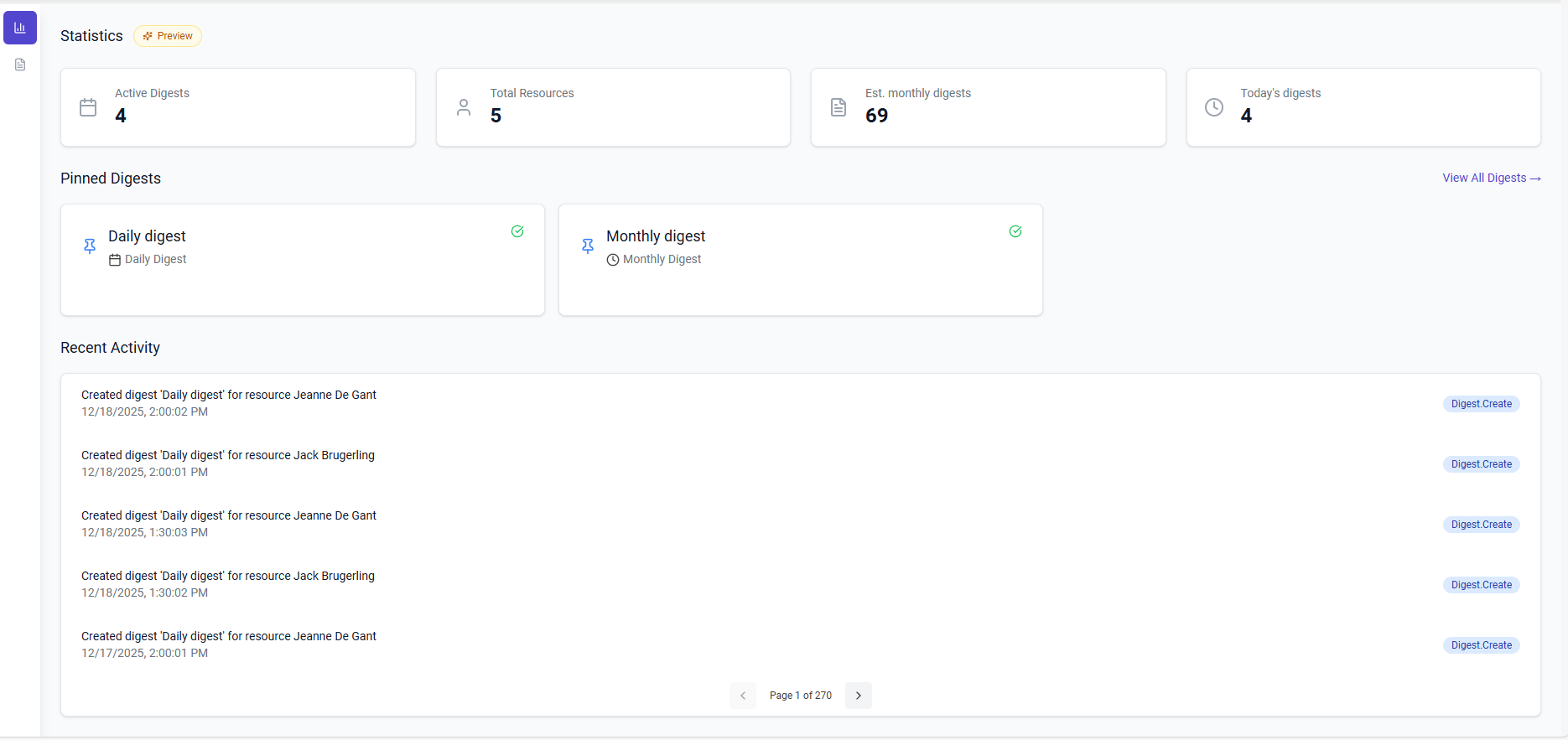
The digest lives under Settings, in the automation group, as Digest. The screen has two views, switched with the icons on the left:
- Dashboard is the overview. It shows a row of statistics (Active Digests, Total Resources, Est. monthly digests, Today's digests), the digests you have pinned for quick access, and Recent Activity: the audit log entries the digest job wrote, such as "Created digest 'Daily digest' for resource Jeanne De Gant". The statistics carry a Preview badge; the monthly figure is an estimate derived from each active digest's frequency and number of recipients, not a count of emails actually sent.
- Digests lists every digest as a card with its frequency, the number of selected resourcesResourceAn entity that can carry out work - a person, vehicle, tool, or room - that you schedule on the planning board. and when it was last updated. From here you create a new one with New digest, pin or unpin a card, open it for editing, or delete it.
Clicking a card opens the digest's detail page: a read-only view of its configuration with Pin and Edit at the top, and a Danger Zone at the bottom.
What a digest consists of
A digest is one answer to four questions: when does it go out, what period does it cover, what does the PDF look like, and who receives it. The form is split into four sections that follow those questions.
Name it and switch it on
Basic Information holds the Name (required, and used in the email subject and the PDF header), an optional Description, and the Enable digest toggle. Only enabled digests are picked up by the scheduler. Disabling one keeps the configuration but stops the emails, which is the simplest way to pause a digest over a holiday period.
Decide when it runs
The Settings section starts with the schedule. Frequency is Day, Week or Month. A weekly digest asks for a Day of Week; a monthly one asks for a Day of Month (1 to 31; a day that does not exist in a given month is skipped that month). Every digest has a Schedule Time, in half-hour steps, and a Timezone. The timezone matters more than it looks: it decides both when the digest fires and what "today" means when the planning is collected, so pick the timezone of the people reading the digest rather than your own. The form proposes the timezone of your browser for a new digest.
Behind the scenes, Dime.Scheduler checks every half hour which enabled digests are due in their own timezone and queues them. The email typically arrives within the half hour that contains the scheduled time, not at the exact minute.
Decide what period it covers
Date Range (days) is a slider from 1 to 30. The range always starts today, in the digest's timezone: 1 day is today only, 7 days is today through the next six days. The date range and the frequency are independent. A daily digest with a 3-day range gives every recipient a rolling three-day look-ahead; a weekly digest on Monday with a 7-day range covers exactly the working week.
Decide how the planning is organized
Scope is the choice between one document and many:
- Create one digest for all included resources produces a single PDF that covers everybody. Global Scope Organization then decides its layout: Group planning by resource gives each resource its own section, with their contact details and a per-day total of tasks and hours; Show all planning in chronological order gives one page per day with every appointmentAppointmentA task scheduled to a resource for a specific period - the scheduled instance you see on the planning board. in time order and the assigned resources named on each card. The first reads like a set of individual schedules bound together; the second reads like a team day sheet.
- Create digest per resource produces a separate PDF for each resource containing only that resource's appointments.
Fields Configuration, at the bottom of the form, decides what each appointment card shows besides its time, duration and subject. The left list, Fields to be used, is what goes into the PDF, in order; the right list, Fields not used, offers the remaining fields from the job, task, appointment and resource tables, with a tab per table and a search box. Drag a field across, or use the arrow to add it and the cross to remove it, and drag within the left list to reorder. A new digest starts with the customer name, job number and resource display name. Keep the list short: every field becomes a row on every appointment card, and a field crew reading on a phone will thank you for a one-page day.
Decide who receives it
Delivery has two options:
- Send to central email inbox emails the PDF to the single Email Address you enter. This is the option for a manager, a dispatcher, a customer or a subcontractor: anyone who is not a resource in Dime.Scheduler, or who needs the whole team's planning rather than their own.
- Send email to resources emails the PDF to each included resource at the email address on their resource record. Resources without an email address are skipped silently, so check that field before you rely on this option.
When the scope is Create digest per resource, each resource's PDF always goes to that resource's own email address, whatever the delivery setting says.
Resource Selection decides which resources are in scope: All resources, or Selected resources, where you tick them in a list that can be searched by name, email or departmentDepartmentA grouping of resources used to sort and group rows on the planning board and in the grids. As a group behavior in the crews view, a department cannot be booked; it exists for structure and reporting.. With the selected option, at least one resource must be ticked before the digest can be saved.
Running and checking a digest
The form saves with Save (or Ctrl+S) once every required field is valid. From then on the scheduler does the work, and the dashboard tells you whether it did. Every generated email leaves an entry in Recent Activity, and the job also logs when it found no resources or no appointments for the period, which is the first place to look when someone says their digest did not arrive. The same entries are available in the audit log under the Digests category.
To test a configuration without waiting for the schedule, open the digest's detail page and use Run Now under Run Digest Now in the Danger Zone. This is not a preview: it generates the PDF and sends the real emails to the configured recipients, and it does so even when the digest is disabled. Point a new digest at your own inbox first, then switch the delivery once the output looks right.
Delete Digest, in the same Danger Zone and on the list cards, asks for confirmation and cannot be undone. Prefer disabling over deleting when there is any chance the digest comes back.
Read more
- Planning digest in the user guide: what recipients receive and how the PDF is laid out.
- Resources: where the email address used for resource delivery comes from.
- Audit log: the full history of digest runs.