Admin center
Administration in Dime.Scheduler covers a lot of ground: users and roles, calendarsCalendarA definition of when work can happen, for the whole tenant or for specific resources: business hours, weekends and holidays. Calendars shade non-working time on the planning board and skip it in Gantt durations., indicatorsIndicatorCollective term for the visual signals - categories, time markers, pins, and tags - that identify and label appointments., field templatesField templateA rule that composes an appointment subject and body from job and task fields, so the text reads the way planners want., connectorsConnectorAn integration that links Dime.Scheduler to a back-office system, routing data in and scheduling decisions back out., Exchange, API keysAPI keyA credential that authenticates calls to the Dime.Scheduler API. The preferred way to integrate over the deprecated JWT flow., audit logs. Each has its own page, and knowing which one you need assumes you already know the shape of the product.
The admin centerAdmin centerThe page that lists every administration and settings screen with a search box, plus a strip of things needing attention such as failed transactions and license usage. is the answer to "where is the setting for that". It lists every administration and settings page you have access to, each with a line describing what it is for, and a search box over the lot. Type what you are trying to do rather than remembering where it lives. The pages are grouped the way the product thinks about them: user administration, administration, scheduling, display, automation, Exchange and monitoring.
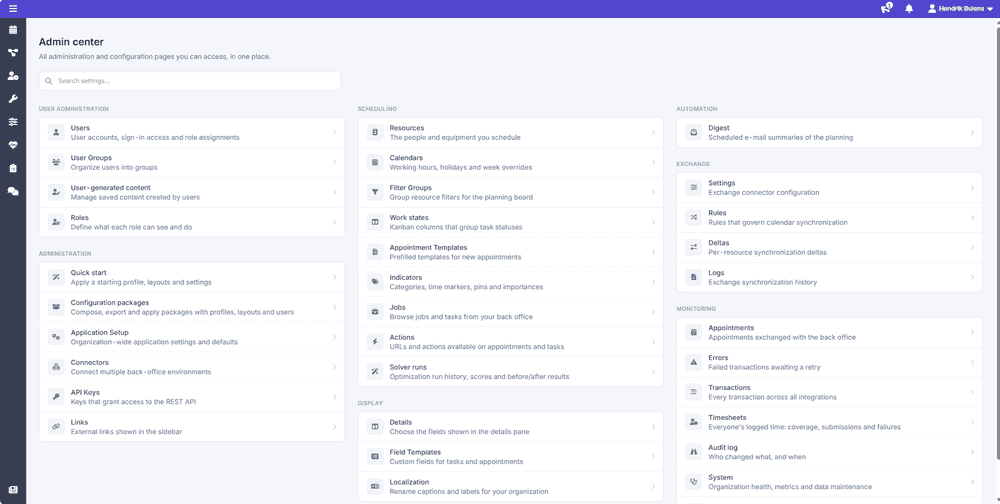 The admin center
It is reached from the menu under your name, and appears for users with administration or settings access.
The admin center
It is reached from the menu under your name, and appears for users with administration or settings access.
Needs attention
Above the directory sits a short strip of things worth knowing about right now. It is deliberately small: these are conditions that tend to go unnoticed until somebody complains.
- License validity, if the tenant's license is not valid.
- License usage, showing how many of your licensed resources and Exchange resources are in use. Useful before onboarding a batch of new people rather than after.
- Failed transactionsTransactionThe recorded call Dime.Scheduler makes to a connected system when the planning changes. It counts as successful on an HTTP 200, which means the endpoint received it, not that the back office processed it., when there are transaction errors waiting to be dealt with. See transaction errors.
- No planning profile yet, on a tenant where nobody has set up a planning viewPlanning viewThe main screen of Dime.Scheduler, where a profile lays out the components a planner works with. A new tenant has none until a profile is created or applied from a template.. This one links to the quick start templates, since an empty tenant is a setup problem rather than a fault.
An empty attention strip is the normal state, and means nothing needs you.
Related
- Configuration packages and quick start - the two pages here that move a whole configuration at once.
- Transactions - the full transaction log.
- License - what the license covers and which modules are optional.